

1.3 Economics of selling to home services
Connect rate optimization is the highest impact lever for many GTM orgs
The single most important metric to track when measuring your outbound motion is decision-maker connect rates, a gap between 3% and 12–15% drastically affecting your unit economics.
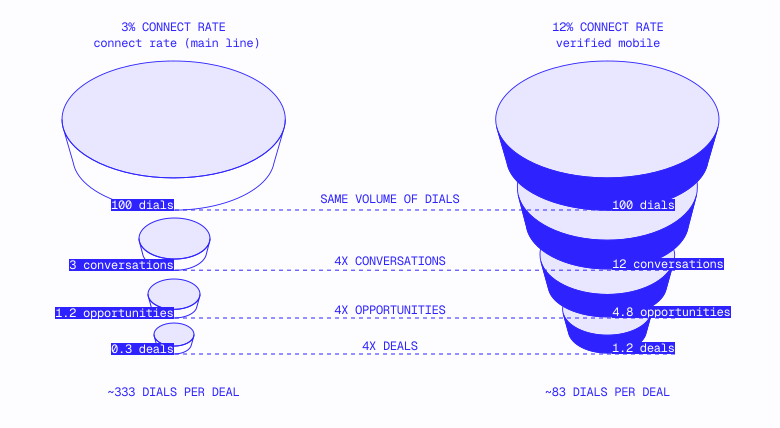
At a 3% DM connect rate (main line numbers, no mobile data):
- 100 dials → 3 decision-maker conversations
- At 30% opportunity conversion → 1.2 opportunities per 100 dials
- Need 600–700 dials per closed deal
At a 12% DM connect rate (verified mobile numbers):
- 100 dials → 12 decision-maker conversations
- At 30% opportunity conversion → 4.8 opportunities per 100 dials
- Need 150–170 dials per closed deal
Same rep. Same script. Same product. Four times more efficient—purely from data quality.
One company measured this directly and saw a 70% increase in decision-maker connect rates from switching to verified mobile data. Another saw meeting book rates increase 3–5x. A third validated via pilot, connect rates going from 3% (a historical baseline) to 8.1% in a 200–contact test—exceeding the 7% target.
Win rate follows connect rate
Connect rate doesn't just affect pipeline volume but pipeline quality as well, verified mobile data ultimately improving both connect and win rates for one GTM team tracking contacts by source.
The logic: reaching the actual decision maker (not the office manager or a voicemail box) means better discovery, tighter qualification, and higher downstream conversion. This economic connect-rate leverage compounds throughout the entire funnel, particularly important when you’re selling to upper SMB or mid-market accounts where the business number is not the direct number of the owner but a gatekeeper instead.
Ensuring your reps have DM mobile numbers becomes particularly important as you look to move upmarket and sell to more sophisticated companies with higher headcount. Business phone numbers for these types of companies often lead to a receptionist, dispatcher, or gatekeeper, which drastically drops rep efficiency.
Enabling your reps to reach decision makers directly is the highest-leverage RevOps initiative you can implement when selling to home services.
Manual research is an enterprise “best practice” that kills rep efficiency in local GTM
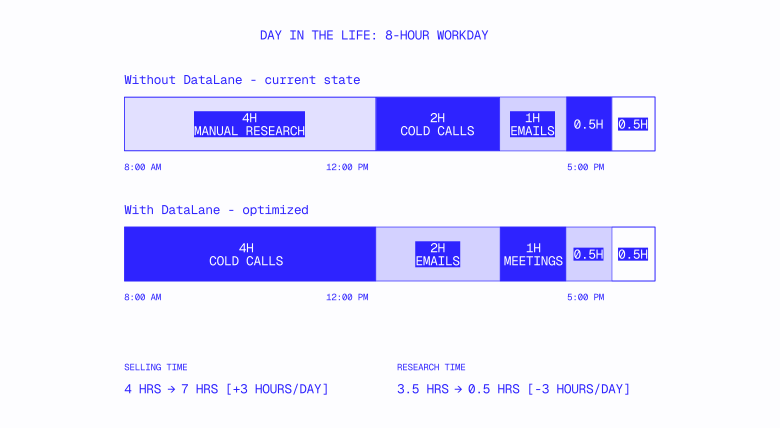
Preload key data into CRM, and remove the need for manual research as part of a lower-ACV, short-sales cycle motion.
When selling to Fortune 500s and tech companies, deep account research drives returns. These are more complex accounts with unknown needs and multiple stakeholders to understand. Most importantly, a very narrow set of accounts to work at high ACVs justify the research time reps invest.
DataLane has an account list of 160 target accounts we need to sell to. You bet we’re going deep on every single account!
Selling to local businesses is the complete opposite.
Instead of a 160-account list for the entire company, a single rep often works hundreds of accounts when selling to home services.
Within this vertical, once you know several key data points, any further research offers low marginal returns when it comes to improving win rates. The key data points we believe are the most important for account identification and for reps to build talk tracks with include:
- Decision-maker mobile number
- Decision-maker first name
- Company name
- FSM software
- Commercial vs residential
- Google reviews
- Trade
- PE-owned
- Franchise hierarchies
After loading this intel into the CRM, you drastically cut down manual research time and can run dedicated campaigns based on a certain data attribute (commercial only, plumbers only) with standardized talk tracks and little personalization or research.
At the systems level, local GTM deals have lower ACV and faster sales cycles compared to enterprise—meaning a core competency of local GTM is working a high volume of accounts with high close rates.
Throughput and the volume of accounts your reps touch matter exponentially more. When each account often has a singular decision maker with predictable needs mapping to your other hundreds of customers, you want to standardize your inputs and process as much as possible in this environment.
Measure what matters; shadow your reps for a day.
One of the most eye-opening moments for RevOps teams we work with occurs when they sit down to shadow their reps.
When our CTO Ganesh shadowed one of our customer’s reps for a day, he timed the activities they were working on to ultimately learn they were spending 40%+ of the day on non-selling activities and drastically lowering their throughput in the process.
The pipeline impact is linear; 40% less time spent selling translates to 40% fewer meetings and closed deals.
The activity consuming the most non-selling time? Manual research.
Every five minutes of research time that a rep spends on an account will add an extra hour of non-selling time for every 12 accounts they need to work.
This is not a case against rep intel, but a case against having reps spend selling time researching information that should already be in the CRM.
Great data is high leverage that kickstarts a positive flywheel effect. More efficient reps close more deals, meaning you can hit targets with a smaller team and then reinvest the savings into marketing and RevOps to help reps close even more of them.
This isn’t just theory. In adjacent verticals, we see CROs like Kyle Norton executing this playbook successfully.
RevOps needs to own data quality, account selection, and account scoring.
Implemented well, this allocation of responsibilities solves two key strategic problems that once hurt economics, as follows:
- Reps stop wasting time on manual research as you align their costs directly with revenue-generating activities.
- You only work best-fit accounts, drastically improving win rates and lowering churn.
1.4 The post-sale data problem
According to their annual report, ServiceTitan revenue grew 26% from fiscal year 2024 to 2025, customer count only grew 12%: half the rate of revenue growth.
This isn't a data anomaly; it's strategy. ServiceTitan states explicitly in its 10-K: "We focus on increasing the GTV on our platform, rather than new customer count." Average revenue per active customer implies roughly $86K per year, far above the $6–12K base subscription most people associate with FSM software.
The gap is expansion revenue: FinTech products, Pro add-on modules, and multi-location expansion within PE-backed portfolios.
Housecall Pro runs the same playbook, which CRO Roland Ligtenberg describes as the "layer cake" strategy: land with the core platform then stack payment processing, consumer financing, marketing tools, and add-on modules over time. The initial sale is the foundation. The real economics come from what you build on top.
This is the model for every home services software company with a growing product suite, and it creates a data problem most teams don't realize they have: The same data gaps that break acquisition also break expansion and retention, but the dollar impact is larger because you're losing revenue from accounts you already paid to acquire.
The two plays
The post-sale data layer enables two distinct motions, but most companies can't run either one.
Most CS teams can't run either play due to the lack of a signal: CSMs managing 200 accounts with no visibility into which ones are at risk, ready to expand, or were never a good fit to begin with.
The offensive play: expansion as a data problem
The layer cake depends on account intelligence.
ServiceTitan is explicitly repositioning its CSMs to drive expansion. From its 10-K: "As we continue to evolve the customer experience, we expect that CSMs will increasingly focus on the ongoing customer relationship, driving retention and product expansion."
Some companies go even further, running dedicated post-sale outbound reps whose sole job is calling existing customers about add-on products. Separate from CSMs and AEs, this second outbound motion requires the same data infrastructure as the first: learning the right contact, current product mix, and if they’re at a scale threshold for the next product.
Whether you staff expansion with CSMs, dedicated BDRs, or AEs working existing accounts, the data requirements are identical. You need to know:
- When a customer crosses a scaling threshold. A plumbing company that goes from six to 12 technicians has hit operational complexity calling for dispatching, routing, and workforce management tools. That's an upsell trigger, but you're still treating the company as a six-truck shop if your CRM only has data from when it signed.
- When a customer opens a new location or enters a new service area. Each new location is an expansion opportunity with respect to additional seats, licensing, and payment processing volume. One lifecycle team lead described this gap: "Finding those missing contacts from our existing customer base would be incredible. We usually have a decision maker, but we don't have (especially in the mid-market accounts) everyone on those accounts in our system."
- When a customer's HoldCo acquires new brands. The expansion opportunity is enormous for PE-backed accounts. If one portfolio brand is thriving on your platform, the HoldCo has a direct incentive to roll it across every brand. Your CSM needs to know the hierarchy exists, and that the HoldCo just acquired three new brands. See Section 1.11 to learn how HoldCos evaluate and roll out technology across portfolios.
Qualification quality flows through to expansion.
Here's the connection most teams miss: the DQ cascade in Section 1.10 isn't just about acquisition efficiency. It's about planting accounts that can grow.
If you land a customer that’s too small (two technicians, no office staff), add-on product expansion will never happen given the lack of personnel and corresponding usage. One major platform, for example, has a hard cutoff of four technicians and one office staff as a minimum; customers can't achieve platform success with anything less given that no one in the office is available to actually drive adoption.
If you land a commercial contractor requiring project management (not FSM), the company will churn before ever seeing your payment processing product. Every bad-fit account that makes it through acquisition is an expansion opportunity that never materializes—and a CSM slot that could have gone to a customer with real growth potential.
Onboarding is the bridge between acquisition and expansion.
Onboarding cycle time—how quickly a customer goes from signed contract to productive usage—correlates with both churn and expansion potential.
The onboarding-to-expansion pipeline is sequential: a customer that doesn't fully adopt the core platform will never buy the layer cake. In home services specifically, self-serve onboarding has limits. As one former head of ops put it, "Blue collar, they want to talk to someone." The human touch in onboarding isn't going away, which means onboarding capacity directly constrains your expansion pipeline.
The defensive play: fighting churn with CSMs
CSM math that breaks
The instinct when churn creeps up is to reduce the CSM-to-account ratio. One major FSM platform, for example, went from 1:200 to a significantly lower ratio since managing 200 accounts was "impossible." Another independently reduced from 200 to 60.
The math quickly breaks, though, at SMB price points as follows:
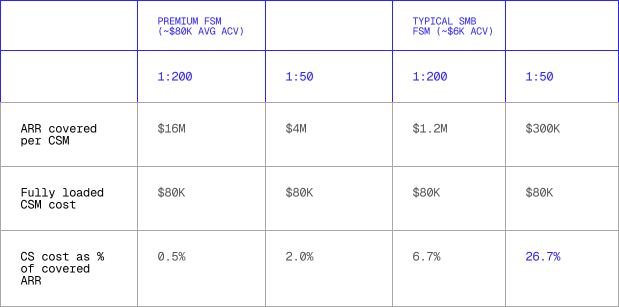
At $6K ACV, going from 1:200 to 1:50 means a quarter of each account's value is consumed by the person managing it. Cut to 1:100 instead: 50 more CSMs at $80K and $4M in additional cost. Even if churn drops from 15% to 12%, you're saving $1.8M at a cost of $4M with a negative ROI. Every CS leader we've spoken to hits this wall: "I'd love to go to 1:50, but the math stops making sense."
1:200 churns too much. 1:50 costs too much. The ratio is not the variable that matters, though. Intelligence is. How much does your CSM know about what's happening inside his or her 200 accounts in the absence of insight shared by the customer?
Small accounts compound the problem.
The ratio trap is worse than headcount math suggests due to hidden cost asymmetry: small accounts aren't just low ACV but also high cost-to-serve. One major FSM platform found its smallest shops generated the highest support ticket costs per dollar of revenue; CSMs servicing these accounts were spending too much effort on customers with the lowest expansion potential and the highest churn probability.
The fix isn't to abandon small customers but instead simply know which accounts are bad fits so you can set appropriate expectations for their retention trajectory and reallocate proactive effort to accounts where intervention changes outcomes.
Book switching has a cost.
Territory and account reshuffles don't just affect acquisition but damage existing customer relationships. One customer, on a call with a vendor, put it bluntly: "We love the product, all going amazing, but our CSM has been switched and our salesperson has been switched on us three times in the last year. Can we have some stability?"
Data-driven triage is better than constant reshuffling. If your CSMs have the intelligence to prioritize the right accounts, you don't need to keep rebalancing books but instead make each book more workable.
From reactive to proactive: the infrastructure
The shift from reactive retention to proactive triage mirrors the shift from undifferentiated outbound to signal-based prospecting, the signals predicting account health are the same ones used for acquisition scoring (Section 1.8): competitor detection, job postings, ownership changes, new locations, and PE acquisitions (just read differently post-sale).
The three-layer model
Most companies are at Layer 0 with no external signals reaching CS at all.
Layer 1: Signal collection. Route the same external data used for acquisition—job postings, ownership records, competitor detection, permit activity—to the CS team. Not a new data investment, it’s routing existing data to a different consumer.
Layer 2: Account health scoring. A red/yellow/green score per account based on three to four signals (first party usage trends, ownership changes, business growth direction) is dramatically better than nothing. Start here.
Layer 3: Prioritized routing. When it comes to a weekly digest (e.g., "These are your 15 accounts that need attention this week, ranked by severity, with the reason") via a CRM report, Slack, or Monday morning email, the mechanism matters less than the consistency.
One team already reflects what Layer 3 looks like in practice: Slack bots integrated with Salesforce so a CSM can type "Tell me the latest on this account" and receive renewal dates, usage trends, and recent activity pulled from multiple sources.
The result: "If you reduce the reactive component and the time they need to prepare and navigate, you've basically given them 50% of their time." This recovered time is what makes the proactive model—both offensive and defensive—possible without adding headcount.
The implication
Companies selling to home services are spending millions trying to solve a signal problem with headcount, but the CSM:accounts ratio isn't the problem here.
A CSM with 200 accounts and a triage layer highlighting the 30 needing attention this week isn't managing 200 accounts but instead 30—with 170 on monitored autopilot.
The data layer that helps you find, score, and prioritize accounts for acquisition is the same one helping you retain and expand accounts post-sale. The signals are the same. The infrastructure is the same. The only thing that changes is who's reading the output and whether the conversation is about preventing a loss or capturing a win.
The layer cake doesn't build itself; every product you stack on top of the initial sale requires someone to know if the customer is ready for it. If your CSMs are flying blind, you're not just losing accounts but in fact leaving the most valuable part of your business model on the table.
1.5 Compensation benchmarks for home services GTM roles
BuildOps pays $160k OTE for SMB AEs. Housecall Pro pays $75k. Both sell software to home services companies. The difference isn't generosity; it's that BuildOps sells to commercial contractors whereas Housecall Pro sells to residential operators. Same industry, 2x comp gap, entirely different economics.
This section shares compensation benchmarks across major home services GTM players, attainment data revealing what reps actually earn, and operating models explaining the variation.
Data source
This section is based on self-reported, publicly accessible RepVue data (with sample sizes noted in tables). Companies with fewer than 25 total salary reviews are excluded; individual role entries with fewer than five ratings are excluded. Five companies were removed on this basis (FieldEdge, Workiz, PermitFlow, Rilla, all under 25 reviews; Rilla's reported numbers were also implausible).
OTE vs Attainment
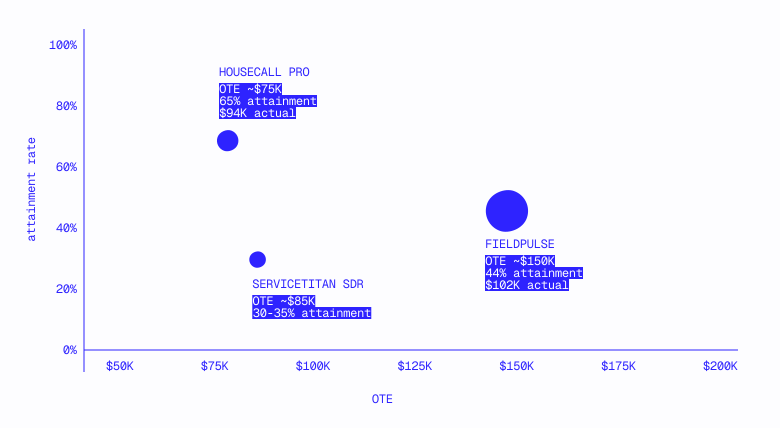
Compensation by company
FSM platforms (residential)
ServiceTitan
The $93k base (62% ratio) reflects a mature sales org that can attract experienced closers.
Housecall Pro
65% to 68% AE attainment is the highest in the dataset. The comp is lower ($75k SMB OTE vs. ServiceTitan's $150k), but reps hit quota consistently. The flat $50k base across AE tiers suggests a standardized comp plan where upside comes from variable components, not promotion.
FieldPulse
With a flat $150k OTE across both tiers, the comp plan doesn't differentiate by segment. The 43% base ratio ($65k/$150k) is the most variable-heavy structure among residential players. Top performers reach $308k. There are 60 total salary reviews.
FSM platforms (commercial)
BuildOps
Commercial contractors means higher ACVs, funding higher comp.
ServiceTrade
A $275k Enterprise OTE with a $924k top performer is the highest individual ceiling in the dataset. Someone is closing massive commercial contracts, but 29% Mid-Market attainment suggests the motion between SMB and Enterprise is still in flux.
Compensation by role type
SDR/BDR roles
Converted from CAD at 0.72 USD/CAD
SMB account executive roles
The range is $75–160k OTE. Where you land depends on whether you're selling to residential operators ($75–150k) or commercial contractors ($100–160k).
Mid-market and enterprise account executive roles
Commercial players (BuildOps, ServiceTrade) occupy the top tier. Housecall Pro's "Mid-Market" at $85k OTE with 68% attainment is a functionally different job than BuildOps' Mid-Market at $200k OTE with 38%; they share a title but nothing else.
The residential-commercial comp divide
The single biggest driver of comp in home services isn't company stage, funding, or market share. It's whether you sell to residential operators or commercial contractors.
BuildOps' $160k SMB OTE and ServiceTrade's $275k Enterprise OTE are funded by commercial ACVs that residential-focused companies can't match.
The implication
The comp range for home services SMB AEs is $75–160k OTE. Where you land depends on two questions:
- Are you selling to residential or commercial? Residential operators buy $3–12K ACV software. Commercial contractors buy $20–100K+ contracts. The ACV funds the comp. Trying to pay commercial comp on residential ACVs will break your unit economics.
- What's your attainment model? Companies with the highest attainment (Housecall Pro and Jobber) pay the lowest OTEs but deliver consistent W-2s. Companies with the highest OTEs (BuildOps and ServiceTitan) accept lower attainment as the cost of an ambitious motion. Both models work, but you need to know which one you're running and be honest with candidates about the same.
1.6 The zone matrix: why trade label ≠ software fit
A "plumbing company" in your CRM could be a three-person crew clearing residential drains in 2 hours or a 200-person operation running multi-year hospital buildouts. Same trade—completely different software need, sales motion, and close rate.
Residential vs. commercial is a useful first-pass filter but a proxy for the real question: What does this company's typical job actually look like?
A commercial HVAC company doing quarterly filter changes has more in common with a residential plumber than a commercial mechanical contractor building out a hospital wing, the trade label and residential/commercial label obscuring the operational reality. What actually determines software fit (and, therefore, GTM fit) is where a business falls on two axes: the duration of their jobs and the complexity of their billing.
A $2K same-day drain clearing and a $1M six-month hospital buildout require fundamentally different software, sales motions, and support models—yet they both show up in your CRM as "plumbing companies."
In this section
- The two axes
- The matrix
- Zone 1: Reactive service
- Zone 2: Sales-driven projects
- Zone 3: Project management
- Zone 4: Enterprise construction
- Mapping the matrix to software categories
The two axes
Job duration isn't about calendar time alone but also operational complexity that compounds with time. A 2-hour emergency call has one tech, one dispatch, one invoice. A 6-month commercial buildout, on the other hand, has multiple crews, phased scheduling, subcontractor coordination, change orders, inspections, and a project manager running the whole thing.
Billing complexity tracks independently from duration, though they do correlate. A 2-day bathroom reno might offer consumer financing (moderate complexity) whereas a 3-month pest control contract bills monthly with no complexity at all.
The matrix
Mapping real work types onto these two axes reveals four distinct zones. The boundaries between them are where most misclassification happens.
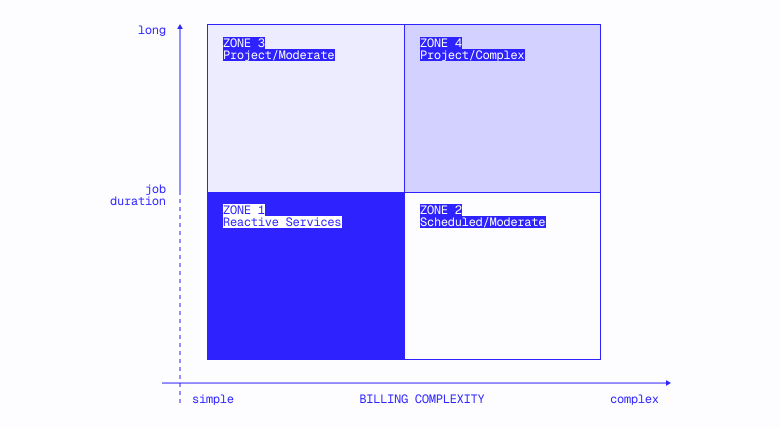
Zone 1: Reactive service
Short duration + simple-to-moderate billing. High-frequency, high-touchpoint work. A technician runs four to five jobs per day, each generating a discrete cycle: booking, dispatch, truck roll, service, invoice, payment, review request, follow-up. The entire workflow—lead to completion to payment—happens in hours or days.
What defines this zone operationally: One dispatch, limited group of techs, one invoice. The business runs on volume and speed: more jobs per day means more revenue. Every software category that runs on frequency (dispatching, call management, payment processing, SMS, review generation, route optimization) has its strongest unit economics here with more events per technician per day to optimize.
This is where the deepest software stacks exist. A Zone 1 business might run a platform (ServiceTitan, Jobber, Housecall Pro), plus payment processing, plus AI call handling, plus marketing tools, plus membership management—each layer justified by the high-frequency operating model. ServiceTitan's average revenue of ~$86K per customer across ~9,000 accounts (from their 10-K) isn't a single product; it's the compounding effect of stacking multiple products on top of a Zone 1 business.
GTM implication: If your product runs on job frequency or customer touchpoints, Zone 1 is your primary market as your highest-conversion, lowest-churn accounts.
Zone 2: Sales-driven projects
Short-to-medium projects + moderate-to-complex billing. An operating model shift from dispatch-driven to sales-driven where software fit gets ambiguous.
What defines this zone operationally: The sale is a conversation, not a dispatch. A roofing sales rep runs an in-home consultation, presents options, handles objections, and closes. A remodeling contractor walks through a kitchen and presents a design. These are consultative interactions where the quality of the sales conversation directly determines revenue.
The job frequency is lower (one to two jobs per crew, per week vs. four to five per tech, per day), but the ticket size is higher ($5K–$50K vs. $200–$1,200). Software categories that run on per-event value—conversation intelligence, consumer financing, and project-based CRM—find their sweet spot here rather than in Zone 1.
One important hybrid: HVAC sits in Zone 1 for service calls but bleeds into Zone 2 for system replacements, such as a $7,500–15,000 sale with an in-home consultation. Companies selling conversation intelligence or consumer financing into HVAC are selling into the Zone 2 slice of a Zone 1 business.
GTM implication: Accounts in this zone require qualification during discovery. The question to ask is: "What percentage of your jobs are completed in a single visit or within a few days instead of multi-week projects?"
Zone 3: Project management
Medium-to-long projects + complex billing. A fundamentally project-based operating model. Jobs aren't dispatched to a single tech for a single visit with sub-trades to coordinate, materials to track across phases, change orders that modify scope mid-project, and inspections gating progress.
Jackson Mechanical in Oklahoma City (83 employees, 63 service trucks, serving hospitals to small cleaners), for example, used paper-based systems and tracked job stages with colored folders before they adopted a commercial-focused platform. That's a workflow problem dispatch-oriented tools weren't designed to solve.
GTM implication: If you sell dispatch-oriented or consumer-facing tools, these accounts are a hard DQ but do provide useful intelligence if you see a company with BuildOps, Procore, or Buildertrend in their stack, that signals where they sit on this matrix. Some also have a service division that sits in Zone 1 as a potential entry point if you can identify it.
Zone 4: Enterprise construction
Major projects + very complex billing. Commercial general contractors, large specialty contractors, industrial construction. Multi-year projects, certified payroll, prevailing wage requirements, bonding, AIA billing formats, lien waiver management.
This is entirely outside the home services GTM motion; these are construction companies, not service businesses. They're included here because they show up in home services lead lists when trade classifications are broad enough to capture them.
GTM implication: This is a hard DQ for most home services software vendors. If you see signals like "AIA billing," "prevailing wage," "certified payroll," or "general contractor -- commercial," remove them before they hit a rep's queue.
Mapping the matrix to software categories
Each zone aligns with an operating rhythm that determines which software categories have product-market fit.
This has direct territory design implications. With respect to accounts for a rep covering "HVAC contractors" in a metro, for example, 40% might fall into Zone 1, 30% in Zone 2, 20% in Zone 3, and 10% in Zone 4—yet the CRM treats all of these identically. Accounts outside your zone are burning rep capacity on structurally unwinnable deals.
The sequence for applying this: product category → zone selection (this framework) → account scoring via signals (Section 1.8) → territory design (Section 1.10).
1.7 The FSM ecosystem: integration constraints and market structure
A home services software company with a native integration into a major FSM platform asked a simple question during a pilot scoping call: "Can you tell us which of our prospects run on that platform?"
This question reveals a structural constraint most GTM teams underestimate: every point solution (AI voice, permitting, photo documentation, financing) often plugs into one or more field service management platform, these integration relationships determining who you can sell to.
Is this data available in your CRM?
The three layers
The layer where you exist changes your entire GTM motion. A permitting tool that only integrates with ServiceTitan has ~11,000 addressable customers, not 500,000. A sales coaching tool integrated with ServiceTitan and two other platforms might have 25,000–30,000. A review platform integrated with six FSMs can sell to anyone.
Integration compatibility as a DQ filter
Most GTM teams disqualify based on size, geography, and trade, but integration compatibility is equally binary:
A 50-truck HVAC company running FieldEdge is not a viable prospect for a tool that only integrates with ServiceTitan, no matter how good the company looks on paper. Until it switches FSMs—a 6-to-12-month project involving data migration, team retraining, and workflow redesign—the company cannot use your product.
The cascading effect on territory planning looks like this:
Most teams skip the FSM compatibility stage, building lists of 50,000 accounts and handing them to BDRs who discover via cold calls that 60–70% aren't on a compatible platform.
Accounts on legacy FSMs (FieldEdge, Successware) or no FSM at all aren't disqualified but instead displacement opportunities. They require a different motion, though, since you're selling as part of a broader platform migration—not a plug-and-play add-on.
What the installed base actually looks like
The integration argument above is structural (and true regardless of the numbers), but the numbers matter because they reveal that "the FSM market" is actually three structurally different ones. Your product's addressable market—and the motion required to sell into it—depends on which of the three you're targeting.
We analyzed FSM vendor detection across 20 major US metros and nine core home services trades. A note on methodology: every percentage in this section refers to share of locations where at least one FSM vendor was detected (not share of all home services businesses). FSM detection covers roughly 4% to 9% of total home services locations depending on metro; the undetected majority either runs no FSM, uses a tool we can't observe externally, or hasn't left a digital footprint. The distribution within the detected set is what's instructive.
Market 1: The platform ecosystem
Defined by: ServiceTitan, and increasingly, the tools that plug into it
ServiceTitan accounts are detected alongside an average of 1.4 other tools per location: CallRail (13%), Scorpion (9%), HubSpot (5%), Sage (5%). These businesses—running coordinated marketing and operations stacks—have CallRail tracking campaigning drive calls, Scorpion managing their digital marketing, and Sage handling their accounting. The FSM is the hub of a multi-tool operation.
The multi-location footprint is distinct. ServiceTitan accounts include 119 multi-location companies across these 20 metros, franchise brands like Mister Sparky, Benjamin Franklin Plumbing, Zoom Drain, and TemperaturePro. The average ServiceTitan business name appears at 1.21 locations in the data.
What this means for your GTM: Selling into this market means selling into an ecosystem, your product one of several tools in a managed stack. The buyer is often an operations manager, not the owner, and integration compatibility is the gating filter.
Market 2: The single-tool operator
Defined by: Housecall Pro and Jobber
Housecall Pro accounts show a starkly different profile to ServiceTitan accounts, 88% detected with no other tool. The average HCP business name appears at 1.05 locations, making these overwhelmingly single-location operations.
The largest HCP multi-location company in the dataset has three locations. The largest ServiceTitan company has 13.
What this means for your GTM: The buyer is the owner with no ops manager, RevOps, nor tech stack to integrate into. Your product either works alongside HCP (or replaces a manual process it doesn't cover) or doesn't fit. The sales motion is simpler, but the ACV is likely lower with a harder-to-reach buyer—the "non-LinkedIn universe" at its most extreme.
Market 3: The trade-specific ecosystem
Defined by: Purpose-built tools that dominate trades where neither ServiceTitan nor Housecall Pro has meaningful penetration
Three trades—pest control, landscaping, and lawn care—account for 27% of FSM-detected locations across these metros. ServiceTitan has a near-zero presence here (3 pest control, 1 landscaper, and 1 lawn care location) while Housecall Pro’s is marginal (21, 12, and 8, respectively).
These trades have their own vendor leaders instead:
Jobber's position is worth noting. It's a top-three vendor in four of nine trades, but its strength concentrates in the trades ServiceTitan doesn't serve . It also holds 25% of landscaping and 36% of lawn care—the highest single-vendor share in any trade—but is a distant third in HVAC and plumbing.
What this means for your GTM: If you sell into pest control, landscaping, or lawn care, the FSM ecosystem looks nothing like the HVAC/plumbing world as the dominant platforms and operating models are different. The integration map must be rebuilt by trade, not assumed from the ServiceTitan-centric default.
The geographic layer: no one dominates everywhere
Metro-level data undermines a common assumption: that ServiceTitan's market presence is uniform and dominant.
For core trades (HVAC, plumbing, electrical, heating, AC)—stripping out pest control, landscaping, and lawn care where ServiceTitan doesn't compete—the picture is surprisingly fragmented:

Eight metros lean ServiceTitan. Twelve lean Housecall Pro. In six of the twenty—Tampa, Dallas-FW, Charlotte, Denver, Austin, Detroit—the gap between them is less than 4%. These are genuinely contested markets where neither vendor has established dominance.
The implication: territory plans that assume an even national FSM distribution will systematically over-count or under-count your addressable market in specific metros. A ServiceTitan-integrated product has a structurally larger addressable market in Phoenix and Minneapolis than in Chicago and Orlando, for example.
What this analysis does not tell you
We don't have revenue or employee count data tied to these vendor assignments but can observe that ServiceTitan accounts are more likely to be multi-location and run larger tech stacks. We can also observe that HCP accounts are almost entirely single-location with no co-detected tools, but we cannot confirm the intuitive conclusion that ServiceTitan accounts are "bigger" businesses in the revenue or headcount sense; a single-location company running only HCP could have 30 trucks and $8M in revenue.
The vendor signal is a directional proxy, not a measurement.
Detection rates vary by metro. NYC shows 3.6% FSM detection against its total home services location base compared to 7–9% in Sunbelt metros. Whether this reflects genuinely lower FSM adoption in dense urban markets or gaps in our detection methodology is an open question, market share percentages (who's winning within the detected set) likely more reliable than absolute volumes.
The data covers detection, not contracts. A business "detected" with ServiceTitan may reflect a trial, expired account, or legacy version. The data tells us what's observable in the wild.
How to use this
The vendor distribution data feeds into several decisions covered elsewhere in this guide:
Territory design (Section 1.10): Metro-level FSM distribution should be a variable in territory balancing. A territory with 40% ServiceTitan penetration (Minneapolis) requires a different approach than one with 16% (Chicago), even if the raw account counts are similar.
Account scoring (Section 1.5): Tech stack depth—the number of co-detected tools—is an additional scoring input. It doesn't replace sizing signals or trade classification, but it adds a dimension most scoring models miss: the operational complexity of the account.
1.8 Home services signals: what actually predicts a good account
The teams that break through in home services outbound score on dimensions that are more difficult to observe but far more predictive: business sophistication, growth trajectory, and operational complexity.
This section discusses what those signals are, how to evaluate them, and how to weight them in a scoring model.
What custom categorization actually looks like
One vertical SaaS company selling to automotive aftermarket businesses went from 30% to 90% ICP accuracy over 13 months, as follows:
Edge cases reveal why top-level categories break. Perhaps an auto glass shop rolled up under "body shop" is excluded despite being core ICP or a top customer shows up as a "car stereo store" because Google's primary tag reflects the retail storefront instead of the installation business.
Auto repair is a simpler problem as one vertical with ~30 subtypes. Home services spans 15+ trades. If "auto repair" needs 13 months to reach 90% accuracy, "contractor"—a single label covering 287,000 businesses—is worse by an order of magnitude.
Standard industry categories are not ICP categories; they're starting points requiring focused sub-categorization work to become usable.
The signal evaluation framework
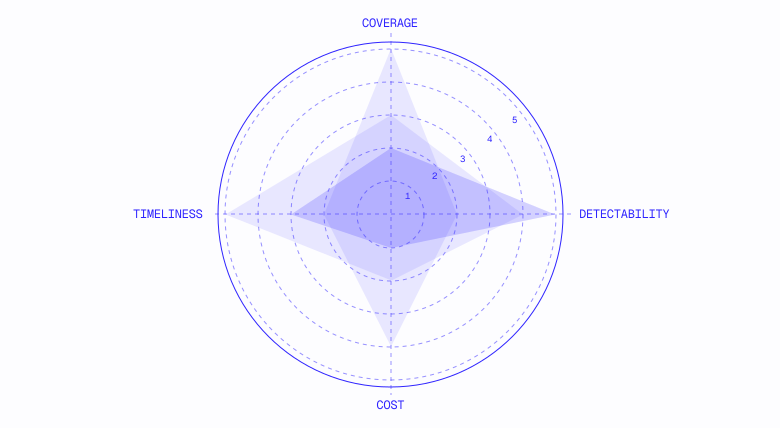
Before any signal enters your model, score it on four axes:
Signals with the highest theoretical correlation (revenue, contract awards) score worst on detectability and cost.
Signals that work at scale (career pages, reviews, licenses, job postings) score highest on detectability and coverage. Build your model from the bottom up, starting with what you can reliably detect and layering in expensive signals only when the incremental lift justifies it.
The four signal categories
Every useful home services signal falls into one of four MECE categories, each answering a different question and driving a different action.
1. Timing — when to reach out
2. Qualification — who fits your ICP
Reviews deserve caution. The distribution is a steep power law. The data by zone is as follows (from Section 1.6):
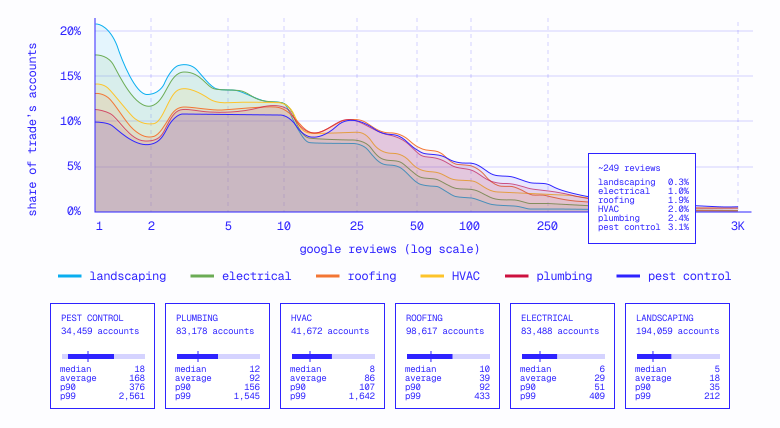
The review curve reflects a classic power law, where a small number of accounts with hundreds of reviews pull the average far above typical.
Set a high threshold, and you're cherry-picking the same sliver as every other competitor. Set it too low, and you can't distinguish a growing shop from a closed business.
3. Competitive / technographic — what they're already using
Greenfield outperforms displacement. Multiple GTM teams report that selling to businesses currently lacking software is significantly easier than displacing a competitor.
Per one sales leader: "The switch motion is a lot harder for us because there's so much feature parity across all the competitors." Greenfield accounts don't require overcoming switching costs, data migration anxiety, or emotional attachment to the current system.
4. Operational momentum — trajectory of the business
Permits are the corrective for the review blind spot. A business with zero reviews but hundreds of permit pulls is a "diamond in the rough"—thriving but invisible to review-based models. State licensing databases offer near-total coverage in regulated trades (CA CSLB alone: 225,000 licenses, 99.9% with phone numbers).
Signal hierarchy for scoring
Sophistication and size dominate when weighting signals, trade a loose filter at best.
Build lead lists with loose trade filters and tight sophistication filters rather than the reverse. Accounts with 250 reviews and visible branding are easy to find—every competitor is calling them. Accounts with 10 reviews, a branded domain, and a recent hiring post are more difficult to find but far less contested.
Most teams don't realize how small their visible market is (typical coverage: 10–15% of addressable market in CRM). A roofing company with 11,000 accounts in HubSpot against a TAM of 85,000. An auto shop platform with 20,000 accounts against 200,000, the remaining 85–90% not scored at all. A scoring model only works on accounts you can see; coverage and scoring are two sides of the same coin.
1.9 The permit data trap: why building permits aren't enough for your GTM team
Building permits are one of the most frequently requested data signals in home services GTM. The logic is compelling: a contractor pulling 50 HVAC permits per month in Phoenix is active, growing, and likely in the market for software. Permits are public record, and every major city has an open data portal—seemingly free intent data sitting in government databases.
We tested this same assumption empirically and pulled 2,000 records from each of 15 metro open data APIs: 30,000 records across NYC, Chicago, Austin, LA, Dallas, Philadelphia, Raleigh, San Diego, Cincinnati, Buffalo, New Orleans, Pittsburgh, San Jose, Boston, and Salt Lake City. The data exists, and the fill rates on contractor names are good— but the gap between "data exists" and "data I can use for outbound" is massive.
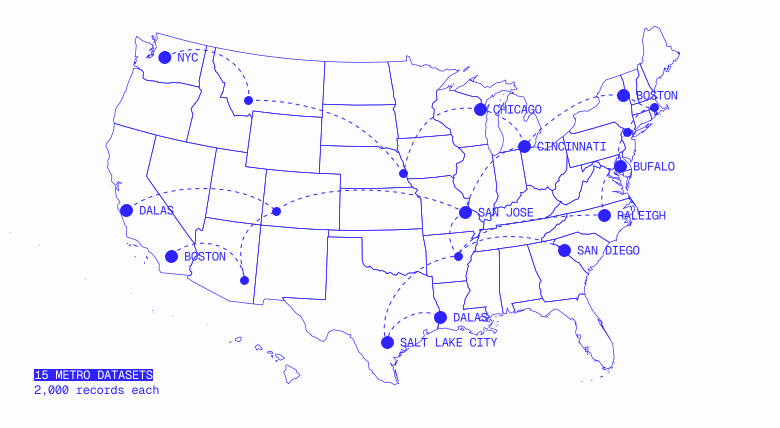
Permit data is a demand signal, not a contact database. It tells you who's doing work but doesn't give you enough to actually reach them in most metros.
The entity-resolution problem
Even when you have a contractor name, matching it to your CRM or enrichment database is more difficult than it looks. We searched for three national brands across all 15 metro datasets to see how consistently they appear.
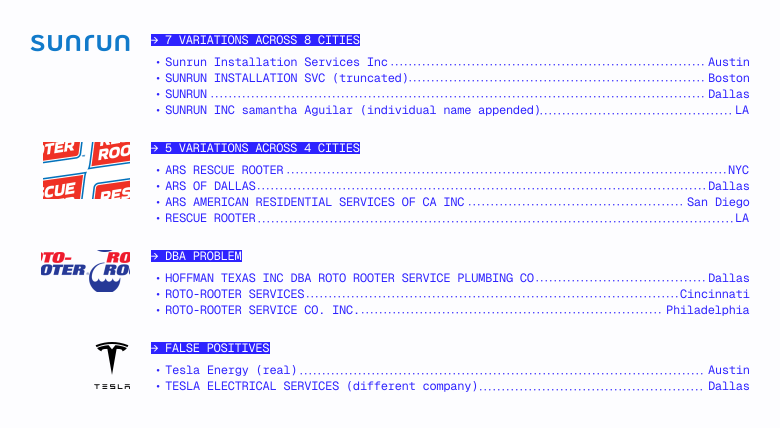
Sunrun appears as seven distinct variations across eight cities. "Sunrun Installation Services Inc" in some metros. "SUNRUN INSTALLATION SVC" in NYC (truncated). Just "SUNRUN" in LA. "SUNRUN INC Samantha Aguilar" in San Jose (individual name appended). Mixed case in some, all caps in others.
ARS/Rescue Rooter appears as five different variations across four cities. Dallas has two variants in the same city: "ARS RESCUE ROOTER" and "ARS OF DALLAS." San Diego uses the full legal entity name: "ARS AMERICAN RESIDENTIAL SERVICES OF CA INC." LA drops the ARS brand entirely and lists "RESCUE ROOTER."
Roto-Rooter shows the DBA problem. In Dallas, the contractor name is "HOFFMAN TEXAS INC DBA ROTO ROOTER SERVICE PLUMBING CO." If your CRM has "Roto-Rooter," you won't match against "Hoffman Texas Inc" without DBA parsing. In Cincinnati, it's "ROTO ROOTER SERVICES" (no hyphen). In Philadelphia, it's "ROTO-ROOTER SERVICE CO. INC." (hyphen, extra words).
Tesla demonstrates the false-positive risk. Chicago's data includes both "TESLA, INC." (the actual Tesla, doing solar and battery installations) and "TESLA ELECTRICAL SERVICES, INC" (a completely different company).
The real Tesla, meanwhile, appears as six different strings across six cities: "Tesla Energy Operations, Inc." in Austin, "TESLA ENERGY OPERATIONS INC" in LA, "TESLA ENERGY" in Dallas, and "Tesla Energy" in Boston. An entity-resolution system that treats "Tesla" as a single company would conflate two unrelated businesses.
These are national brands with distinctive names, but the problem is in fact worse for regional contractors where the same generic patterns—"[Owner Name] Plumbing," "[City] Heating & Air"—create collisions across unrelated businesses.
What makes matching structurally difficult
NYC truncates names at 25 characters. Thirty-two percent (32%) of business names in NYC's permit data are exactly 25 characters—the telltale sign of field truncation. "MOST PLUMBING & HEATING C" (truncated from "...Co" or "...Corp"). "GALAXY GENERAL CONTRACTIN" (truncated from "...Contracting"). "AARON PLBG & MECH SYS, IN" (truncated and abbreviated).
Abbreviations are inconsistent and non-standard. NYC uses PLBG for plumbing, HTG for heating, CONST for construction, SVC for services, and MECH for mechanical. These aren't standard abbreviations but instead simply whatever fits the character limit. "A & C HTG SERVICES, INC" won't fuzzy match to "A & C Heating Services Inc" in most systems without custom abbreviation expansion.
Personal names vs. business names. Buffalo's "applicant" field is 64% personal names ("PAUL DUGAS SR," "ANTHONY LEE," "TIMOTHY GALLAGHER") and only 36% identifiable businesses; it’s impossible to know if "WARREN HERDIC" is a contractor, homeowner, or property manager without cross-referencing against another database.
DBA names vs. legal names. Dallas shows "HOFFMAN TEXAS INC DBA ROTO ROOTER SERVICE PLUMBING CO." A CRM search for "Roto-Rooter" won't find "Hoffman Texas." A CRM search for "Hoffman Texas" won't tell you it's Roto-Rooter. You need DBA parsing logic for every record, and most metros don't even flag which part of the name is the DBA.
The contact info problem
Here's what you actually acquire when you pull permit data from 15 major US metros:
One metro out of 15 gives you an email address. Five give you any phone number at all, one of those requiring you to parse it out of a text blob that looks like this:
HOFFMAN TEXAS INC DBA ROTO ROOTER SERVICE PLUMBING CO 3817 CONFLANS , IRVING, TX 75061 (972) 986-1027
That's the entire contractor field in Dallas: company name, DBA, street address, and phone number concatenated into one string with irregular spacing. Every Dallas record looks like this.
The remaining 10 metros give you a company name and nothing else. For three of those 10, you don't even get a reliable contractor name—just an "applicant" field where 64% of entries are personal names like "MICHAEL WERBOWSKI" or "HOME OWNER MATHAN SELVAKUMAR" (actual data from Buffalo). In this way, you have no idea if the applicant is a contractor, homeowner, or property manager.
This means that if you pull permit data and want to actually call someone, you still need to take that same company name, run it through an enrichment provider to find a phone number and contact, and hope the name matches cleanly enough to resolve. The permit data isn't your prospecting source at this point but a filter on top of a contact database you already need.
The normalization tax
Fifteen metros, 15 different schemas. Here's what "just pull permit data" actually returns.
Fifteen different field names for "contractor." NYC calls it permittee_s_business_name. Austin uses contractor_company_name. LA has contractors_business_name. Chicago has a 15-slot contact array (contact_1_name through contact_15_name). Dallas puts everything into a single contractor text blob. Cincinnati calls it companyname. Salt Lake City misspells it as applicatname,not a typo in this document but the actual field name in the schema.
Four different API platforms. Socrata (10 metros), CKAN (3 metros), ArcGIS FeatureServer (1 metro), CARTO SQL (1 metro): each with its own query language, pagination model, and authentication approach. A single integration won't work.
Status filtering that isn't obvious. NYC's contractor fill rate is 26% if you query raw data, 99% if you filter to permit_status = 'ISSUED.' The unfilled 74% are in-process applications that don't yet have a contractor assigned.
Pittsburgh shows a similar pattern: 58% overall but 99% for electrical and 98% for mechanical permits; the "Building & Development Application" type (pre-issuance filings) has 0% contractor data and drags the average down. Anyone evaluating these datasets without knowing the right filter will conclude the data is garbage—but it's not! Exploratory analysis for every metro is necessary to discover the right filter.
Chicago's 30-code contact taxonomy. Chicago doesn't have a single contractor field, each permit having up to 15 contact slots (each with a type code). Thirty distinct type codes include duplicate concepts: "MASON CONTRACTOR" and "MASONRY CONTRACTOR," "EXPEDITER," "EXPEDITER (INDIVIDUAL)," and "EXPEDITOR" (three codes for one role, one misspelled), and "CONTRACTOR-PLUMBER/PLUMBING" and "PLUMBING CONTRACTOR" (same thing, different format).
Five different owner variants. In order to extract "Who is the contractor on this permit" from Chicago data, you need to know which of 30 type codes map to "contractor" and iterate through up to 15 contact slots per record.
Every metro requires its own parser. Every parser requires its own exploratory analysis to discover the right filters, field mappings, and edge cases. All of this is tedious work that’s a distraction for your RevOps, data, and engineering teams to create and maintain.
Where permit data actually helps
Don’t take this as a dismissal. Permit data has real value, just not as a prospecting source.
Market sizing. Permit volume by trade by metro is a legitimate TAM signal. You don't need contractor contact information to count "Phoenix issues 4,200 HVAC permits per month in summer"; aggregate counts work fine for market sizing even with messy schemas since individual record quality doesn't matter when you're counting.
Seasonal timing. Our permit data analysis across four cities confirmed seasonal patterns matching contractor activity cycles. Permit volume tells you when to reach out,peak permit volume in HVAC tracking 4 to 6 weeks ahead of peak operational strain. Section 1.13: Seasonal Timing covers this in depth.
Contractor activity scoring as enrichment. If you already have a contractor in your CRM from another source, permit pull volume is a strong enrichment signal. "This HVAC company pulled 47 permits last quarter" tells you the outfit is active and growing, valuable context for prioritization and layered on top of contact data you already have.
The verdict
Permit data is an enrichment signal, not a prospecting source.
Use it for market sizing and seasonal analysis (where aggregate data is fine and individual record quality doesn't matter) and as a scoring layer on top of contacts you already have (where permit volume adds context to accounts in your CRM).
Don't use it to build target lists; 10 of 15 metros give you no phone nor email, entity resolution is brutal, and the per-city normalization cost requires you spend weeks of engineering or RevOps time producing a list of company names still needing enrichment before anyone can make a call.
1.10 Territory design for home services
Most territory planning starts with account count: "We have 20,000 home services accounts in Phoenix. Divided by 10 reps, that's 2,000 each." The math assumes accounts are interchangeable, but in practice, 65–70% of any raw account list won't convert—not because the reps are bad but because the accounts are construction companies, ghost listings, or sole operators who will never buy software. The teams that get territory design right run the disqualification cascade BEFORE assigning accounts, not after.
What makes an account workable
Home services spans construction companies, commercial mechanical contractors, residential plumbers, and sole-operator handymen under a single label. The classification problem is more difficult than for other verticals, the DQ cascade correspondingly more aggressive.
The disqualification cascade
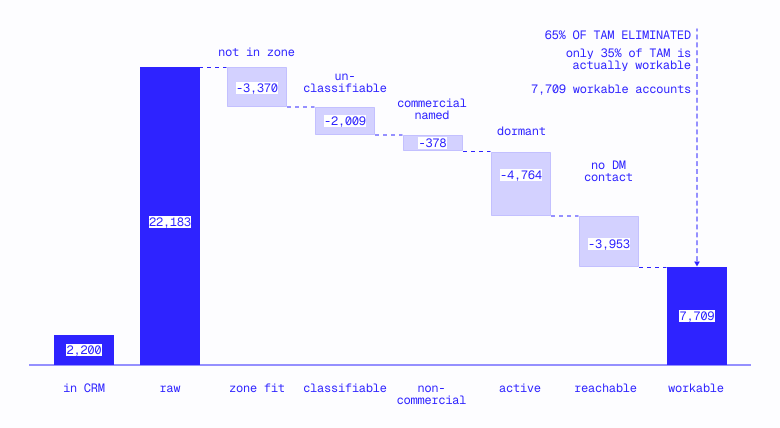
Apply these filters sequentially before assigning accounts to reps. The stages are illustrative for an FSM company; every product will have its own filters.
Stages 1–5 are where home services diverge most from other verticals. For scoring signals supporting stages 4–5, see Section 1.8.
The cascade in practice: Phoenix metro
We ran this cascade against real data in Phoenix: 20 cities, every home services account in the database.
22,183 becomes 7,709, the raw TAM shrinks by 65% before a single account is scored.
The biggest drops: Stage 1 strips construction trades (15% of raw TAM), with Stage 4 stripping zero-review closed listings (30% of the post-zone set). Together, these two filters account for most of the shrinkage.
The 7,709 surviving accounts have a clear profile:
The pattern holds everywhere:
Despite 1.5x differences in raw TAM, shrinkage lands in a tight 65–70% band: a structural property of how home services businesses are classified, not a data quality problem in one market.
Residential vs. commercial: the first DQ filter
The residential-commercial split is the single most important disqualification axis you're probably not applying systematically. Every other segmentation decision sits downstream.
Disqualification is a spectrum, not a binary decision
Why commercial breaks SMB-focused GTM
GTM leaders we spoke with shared that commercial accounts converted at lower rates and churned faster, not because the product was bad but because it was built for a different workflow.
Even if you sell to commercial, you likely want to specialize within your BDR and AE teams—the nature of commercial work meaning you need to sell around a completely different set of value props compared to residential.
Classification signals
No single signal is definitive, and multiple signals compound. Residential vs. commercial is ultimately a proxy; the deeper framework is job duration × billing complexity in the zone matrix.
Product-specific DQ criteria
The cascade above is generic. Different product categories need additional filters, as follows:
The cost of aggressive filtering is a smaller territory; the cost of not filtering is reps spending 20 to 30% of their time on accounts that will never close.
Coverage as a territory constraint
Contact coverage directly affects what's workable. An account with no way to reach the owner is a placeholder, not a prospect.
A territory with 60% verified mobile coverage is fundamentally different from one with 15%, even if account counts are identical. Balance territories on workable accounts with coverage instead of raw accounts.
Licensed trades (HVAC, plumbing, electrical) have structurally higher baseline coverage since licensing creates public records. Low-barrier trades (handyman, cleaning) are more difficult, many operators lack business registrations or a digital footprint beyond a Google listing. Factor trade mix into coverage expectations.
Territory design checklist
1.11 The PE roll-up layer: a hidden market inside your market
If you sell software to home services businesses, you're actually selling into two different markets. One is visible: hundreds of thousands of independent operators running one to 15-truck shops across every trade and metro in the country. The other is hidden (or at least, hidden from most GTM teams): a fast-growing layer of private equity-backed holding companies that are quietly acquiring those independents and consolidating them into multi-brand, multi-trade platforms.
Miss this layer, and you'll actively damage deals. Your junior SDR cold calls a Mr. Rooter in Phoenix with a $5K SMB pitch, not realizing it rolls up to the same holding company as the Mr. Electric in Dallas your other SDR called yesterday—both under a PE firm with a COO your enterprise AE has spent time nurturing for months.
Three reps, three locations, three different messages and price points—your enterprise team's $500K deal reframed as a commodity before they even present.
Understanding the PE layer gives you three things: a map of where enterprise deals actually live in home services, a framework for which trades and metros are consolidating the quickest, and a different sales motion for the ~15–20% of the market that doesn't buy like an independent operator.
The five-layer hierarchy
The structure of a PE-backed home services company looks nothing like what most CRMs capture, most sales teams only seeing the bottommost layer out of five in total.
PE Firm → Platform → Brand → Operators → Locations
Consider a real example. Alpine Investors, a PE firm, owns both Apex Service Partners and Vertex Partners (two separate holding companies). Apex rolls up HVAC, electrical, and plumbing businesses across the Southeast under local brand names like Mr. Rooter. Vertex focuses on roofing and home exterior brands.
Each brand can be franchised to multiple operators, and each operator can own several locations.
A rep prospecting into "Comfort Zone HVAC" in Charlotte sees an independent-looking eight-truck shop. What they don't see is that this is just one brand among dozens under Apex, one of two HoldCos under Alpine.
The nuance is that these layers don't map one-to-one. A single PE firm can own multiple holding companies, a single holding company can own brands across different trades, and a single brand can have locations across different metros. The hierarchy is a tree, not a list—and no standard CRM data model captures it.
Two consolidation models (and how they buy differently)
Not all PE-backed home services companies are structured the same way. There are two distinct models; understanding which one you're selling into determines who you talk to and how quickly decisions get made.
Franchise platforms
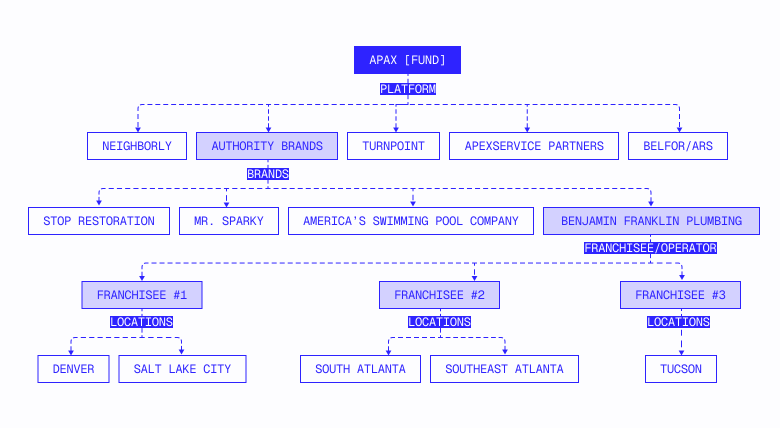
These HoldCos own brands and sell franchises to independent operators. The franchisee is an independent business owner—often an entrepreneur with no trade background—who pays franchise fees and royalties (~5–6% of revenue) in exchange for brand, training, marketing support, and operational playbooks.
Corporate structure creates a counterintuitive dynamic for software decisions: the franchisor typically has the contractual right to mandate technology, but exercising that right is practically counterproductive.
As one former executive puts it: "It's really hard to get however many franchisees you have a hundred percent adoption rate on something, even though contractually you might have the right to do it. You don't want to use the stick before you use the various carrots." Joint employment regulations further constrain what the franchisor can mandate for franchisee employees, specifically.
In reference to the constant tension: "From a franchisor perspective, it would be way easier if everyone was on one platform. But from a franchisee perspective, there's certain aspects of a platform that are well suited to that industry and it would disrupt the franchisees' processes."
The result? Software adoption follows a deliberate sequence: back-office systems first (mandated), then quick-win point solutions (trust-building), then the core platform (maybe never). Brand size is the deciding variable: 10 franchisees can be switched; 200+ is "someday, maybe." See Section 1.6c for the full integration sequence and ease-vs-impact matrix.
Corporate roll-ups
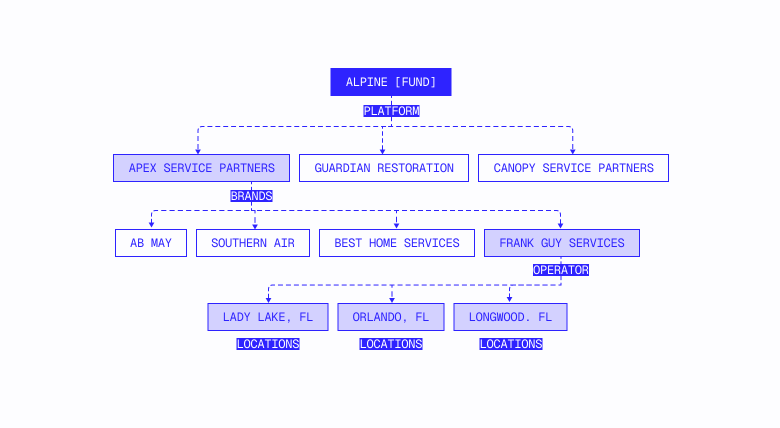
These HoldCos acquire independent businesses outright, taking majority control and integrating them into a shared services infrastructure that typically covers recruiting, training, marketing, finance, procurement, and technology. The previous owner often stays on as a local general manager, and the brand retains its local name; the HoldCo has direct operational control, though. A franchise relationship does not exist.
Apex Service Partners is the clearest example: founded in 2019 and grown to 107 HVAC, plumbing, and electrical brands with 8,000+ employees and $1.3B in revenue. Each acquired business joins a shared services platform but operates independently under its local name. Apex’s dedicated technology and data engineering team drives standardization across the portfolio.
Technology decision-making is more centralized than in franchise platforms with (critically) no carrot-vs-stick dilemma in play. The HoldCo doesn't need to persuade independent business owners to adopt; acquired operators are employees, not franchisees with contractual autonomy. That doesn't mean the HoldCo ignores operator input—smart roll-ups bring their GMs along—but the structural friction that slows down franchise platforms doesn't exist here.
The Sila Services model illustrates how this plays out in practice. Sila's CTO developed what the company calls the "Sila Standard," a standardized technology stack including AI call handling for 90%+ of call volume across all 40+ brands with +35% booking rates. The HoldCo drove the decision, the COE scaled the rollout, and individual brands adopted it—no conditional buy-in process nor herding cats. The HoldCo had the authority to standardize and used its COE to execute.
What's the same across both models
GTM fundamentals don't change here. In both models, your CRM shows individual locations that look independent, the enterprise deal lives within the HoldCo C-suite, and the COE flywheel (land one brand → prove ROI → scale across portfolio) works the same way. The hierarchy-mapping problem is identical; the damage from a junior rep cold-calling into either model is equally severe.
Where the models differ
For your GTM, the practical difference is speed and certainty of decision. A franchise platform may take years to standardize and never mandate your product. While a corporate roll-up can move more quickly, this isn’t synonymous with "instantly."
Local GMs who stay on post-acquisition still have opinions, and keeping them happy is important for retention. The HoldCo drives the decision, but smart ones bring their operators along rather than force compliance.
What this looks like in a single metro: Phoenix
National numbers are useful for sizing the segment, but metro-level data is what your reps actually need. Here's what the PE and franchise layer looks like in one metro—Phoenix—across 12,638 home services locations.
Eleven different holding companies operate in Phoenix, spanning 20+ brand names. A rep without hierarchy mapping would see 20+ "independent" businesses that actually represent 11 buying decisions.
This is one metro. The same pattern—a small but concentrated PE layer, clustered in specific trades, with local PE-backed brands that don't carry national franchise names—repeats in every major market.
Two motions, one CRM
Every account in your CRM looks the same in the absence of PE hierarchy data, some percentage of your supposed “SMB TAM” actually enterprise accounts in any given metro. These require a completely different motion, price point, and decision maker.
The HoldCo C-suite is comprised of former management consultants and PE operating partners sitting in corporate offices. LinkedIn works. ZoomInfo has their direct dials. You can run a standard named-account play against them. That's table stakes, though, once you know who they are—most teams never even getting this far since they haven't done the identification work.
Data sources, talk tracks, deal structures, and success metrics have nothing in common between the two segments; trying to run a single motion across both guarantees dual mediocrity and jeopardizes your most important accounts.
The damage sequence
If you fail to flag and separate PE accounts, here's what happens:
- The wrong pitch: A junior rep delivers an SMB talk track ( "Save 3 hours a week on scheduling") to a brand that's part of a 200-location holding company evaluating enterprise platforms. The prospect mentally categorizes your company as "not serious."
- The wrong decision maker: Reps spend weeks building a relationship with the location's office manager while ignoring the HoldCo procurement team who has the power to kill the purchase.
- The collision: After your enterprise AE nurtured the HoldCo COO for months, the COO says, "One of your SDRs already called our Phoenix location and pitched us on a $200/month plan." Your AE's $400K deal just got reframed as a commodity purchase.
- The burned bridge: Three reps from your company have now contacted three different brands under the same HoldCo with three different messages and three different price points. The HoldCo's RevOps team flags you as disorganized, eliminating you from the RFP before your enterprise team can even present.
Routing rules follow directly; every PE-backed account and brand that rolls up to a known HoldCo gets flagged in your CRM and locked to your enterprise team, and junior SDRs receive geographic territories with excluded PE accounts. If a rep encounters an account they suspect is PE-backed—multiple locations, corporate-sounding website, operating in multiple trades—the protocol should be to pause and escalate, not pitch.
The map is shifting
Most GTM teams treat PE consolidation as a static feature of the market: a segment to account for before moving on. That's a mistake. PE acquisition is an accelerating force that’s actively reshaping your total addressable market quarter by quarter.
Acquisition pace
Apex Service Partners completed 60 add-on acquisitions in 2025 alone, roughly one every six days. The SEER Group averaged one acquisition per month from 2024–2025. Across home services, deal volume rebounded to new heights in 2024–2025 with three times as many active PE buyers as 5 years prior.
Each acquisition converts an SMB account into an enterprise account, the independent eight-truck HVAC shop in your SDR's territory last quarter now a holding company brand with a COO who makes purchasing decisions across 40 locations.
Your enterprise TAM is growing—but invisible without hierarchy data. Every acquisition creates a new brand under an existing HoldCo, yet no standard data tool flags the change. Keeping its name,phone number, and Google listing, the acquired company looks identical to what it looked like pre-acquisition in your CRM.
One company discovered a major PE roll-up only by chance: "A fairly large PE firm just started gobbling up a ton of companies. We just happened to bump into them at an event." No data tool had flagged it. This list requires quarterly maintenance, the account you mapped as independent six months ago perhaps PE-backed today.
The companies that treat their PE hierarchy map as a living entity, cross-reference against acquisition activity, and integrate into CRM are the ones who take full advantage of this opportunity.
Where consolidation is heading
PE consolidation follows population growth. Across 12 major US metros, every one with 4%+ population growth (Charlotte, Nashville, Houston, Dallas, Atlanta) has above-average PE penetration. Every metro with a flat or declining population (LA, Chicago, NYC)? Below average. Mid-size Sunbelt metros (Charlotte at 5.6% PE penetration, Nashville at 5.2%) outpace metros three to five times their size with PE firms targeting growth rate over absolute market size.
If you're planning your enterprise GTM motion for the next 2–3 years, keep an eye on mid-size Sunbelt metros with 5%+ population growth (Raleigh-Durham, Austin, San Antonio, Jacksonville). PE consolidation will follow the population.
1.12 How PE firms and rollups evaluate and roll out technology
The previous sections mapped the PE roll-up universe and its GTM implications. This one goes inside the buying process. How does a 15-brand, 1,300-franchisee platform decide what technology to adopt? What separates vendors that land portfolio-wide deals from those that never make it past a single test?
We had the chance to sit down with Elliot Rosenbaum, former private equity investor at Apax Partners and executive in the home services space, to deep dive on this same topic.
You can watch the full recorded conversation here.
Two integration tracks
When a PE-backed holding company acquires a new brand, integration work falls into two categories. Confusing them—or approaching them the same way—can waste months of selling time.
Track 1: Nuts and bolts. Financial ERP, HR and payroll, IT security—anything needed to make the acquired company look like it's part of the portfolio. These transitions happen immediately post-acquisition, often within 90 days. The holding company already chose its ERP years ago, and the acquired brand is migrated. Vendor competition doesn’t exist at this stage since the decision was made back when the platform was formed. If you sell back-office infrastructure, the buying window is narrow and usually closed before you even knew the acquisition happened.
Track 2: Value creation. Operational and growth tools that improve franchisee performance—AI call centers, marketing technology, training platforms, lead generation, contact data enrichment—is where nearly all live buying activity happens. There's no compliance mandate, the question purely economic: Does this move the needle enough to justify the disruption of a rollout across hundreds of franchisees?
Track 2 is where the ease-of-implementation vs. impact matrix becomes the primary decision tool.
The three growth levers
PE-backed home services platforms have three growth levers as follows, in order of priority:
- Help existing franchisees dominate their local market. Better marketing, new products and services, and operational rigor is always the first focus and where most software-buying decisions originate. Every tool that improves franchisee performance (AI call handling, dispatch optimization, payment processing, coaching) maps to this lever.
- Put new dots on the map. Selling new franchisees into territories the brand doesn't cover yet is a franchise development function (not a technology decision) that creates a recurring onboarding event where new franchisees must be stood up on the HoldCo's tech stack.
- Acquire new brands. Buying another home services company and adding it to the portfolio is where the PE acquisition window opens—every new brand triggering a technology evaluation. The HoldCo discovers fragmented software across the new brand's locations and begins the standardization process.
Understanding which lever is driving a HoldCo's current priorities tells you what it’s buying and when; while a focus on Lever 1 means evaluating point solutions to improve franchisee performance, a HoldCo that just executed Lever 3 is in a standardization window where platform decisions are live.
The ease vs. impact matrix
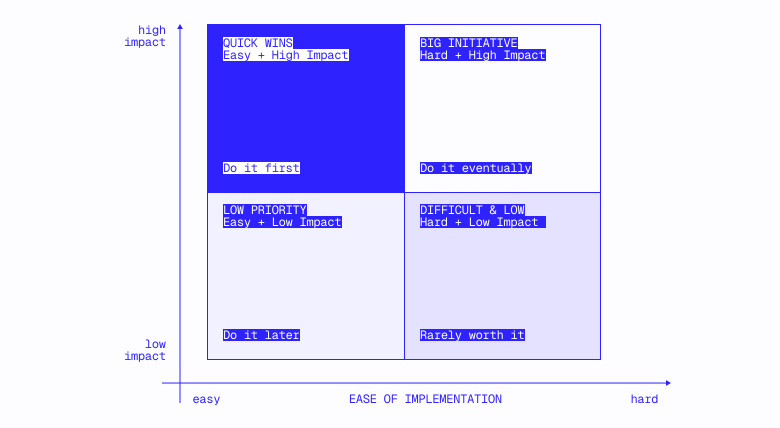
PE-backed franchisors evaluate every piece of operational technology on two axes: how easy it is to implement and how much impact it drives.
Easy + high impact: do it first. These are the quick wins that build trust with newly acquired franchisees and prove the holding company is making their lives better. AI call centers are the current standout; they change one process (inbound call handling) and have a straightforward rollout. One executive described CSR headcount dropping from 10 to 2 while answer-and-book rates climbed 10%, cost down and revenue up simultaneously. That profile gets fast-tracked.
Hard + high impact: do it eventually. This is the franchisee-facing FSM and ERPs—the ServiceTitans, Jobbers, and Housecall Pros of the world. Everyone agrees a unified platform would be valuable, but the switching cost is enormous.
Retraining technicians creates a direct productivity hit. General managers—once the go-to resource—suddenly can't answer basic questions. Recurring billing migrations cause double charges and customer churn. For a newly acquired brand with 10 franchisees, the holding company might migrate early. For one with 200+, the honest answer is often "someday, maybe."
Easy + low impact: low priority. Training modules, phone system consolidation, minor workflow tools. Nobody rushes these. A vendor pitching a phone system that saves $100 a month won't get attention since it doesn't move the needle.
The matrix has a direct implication for sequencing: if you ultimately want the big platform deal, start with something in the “easy + high-impact” quadrant. The tool that works for one brand earns you credibility to propose bigger changes later on. Trying to land the ERP deal first, on the other hand, is backwards.
How to enter a franchise portfolio
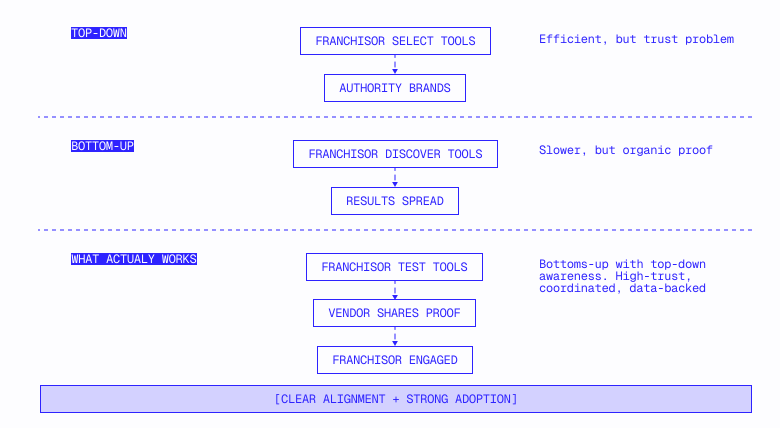
Top-down: The franchisor's operations or technology team identifies a tool via industry events, peer networks, or vendor outreach. This is efficient but has a trust problem — franchisees in newly acquired brand franchisees are already wary of the holding company imposing its will.
Bottom-up: A franchisee discovers a tool, sees results, and talks about it. Word spreads. Eventually, the franchisor's team hears about it. This is slower but builds organic proof.
What actually works: bottom-up with top-down awareness. The vendor engages franchisees to build groundswell and generate results but doesn't go around the franchisor. Franchisees agree on what one executive called "conditional buy-in," interested and willing to test with the explicit understanding that the franchisor must be part of the conversation before anything rolls out.
The vendor brings the case study to the franchisor detailing what was tested, furnishing the data, and sharing the franchisees that want to continue. The franchisor's job of herding franchisees toward adoption just got dramatically easier.
The inverse—going directly to franchisees without the franchisor's knowledge—consistently backfires. The franchisor feels circumvented, viewing even good results with skepticism. The exception is tools the franchisor genuinely doesn't care about: payroll, minor workflow apps, anything that doesn't touch reporting, compliance, or operational visibility. The franchisor is a gatekeeper you want on your side for anything touching the core operating stack.
The practical motion is engaging three to five franchisees within a brand, generating results, getting conditional buy-in, and then bringing the case study to the franchisor's procurement or operations team. Note: multi-brand franchisors often have internal filtering functions that screen vendors before operations ever sees the pitch (with procurement evaluating cost/scalability and marketing doing so for anything touching customer communication).
Your pilot is the sale
In a franchise system, "Close the pilot, then close the deal" doesn’t exist with the pilot evaluated as a go/no-go for system-wide rollout. You may be running head-to-head against an unknown competitor who’s installed at a separate franchise location.
Some franchise systems also maintain corporate-owned locations as controlled testing environments. The holding company has full control, can measure results precisely, and can build a case study without asking a franchisee to take a risk on unproven technology.
The most sophisticated operators test competing solutions in parallel—at corporate locations and large franchisees simultaneously—and compare results before making a system-wide recommendation.
The bar for proof is specific:
Tangible incrementality, not marginal savings. Saving a franchisee $100/month won't get a meeting. Reducing CSR headcount by 80% while increasing booking rates by 10% gets a portfolio-wide rollout. The difference is whether the improvement is meaningful enough to justify the franchisor's scarce attention—because attention, not budget, is the bottleneck in a multi-brand operation.
System-level framing. A franchisor doesn't think about one franchisee. A 1% to 2% improvement in booking rates doesn't sound dramatic for a single location. Across 300 franchisees, though, it's millions in incremental system-wide revenue and increased royalty income. Vendors who frame results in per-franchisee terms miss this, the ones framing in aggregate speaking the franchisor's language.
Proof the rollout won't be a disaster. This matters as much as impact. The franchisor must configure, train, and provide support across hundreds of locations. If the test was clean and implementation straightforward, that's evidence. If it required heavy customization and hand-holding, on the other hand, the franchisor will hesitate regardless of results.
Instrument your pilot at a test location like a final exam, metrics generated during the test serving as a case study the franchisor will use to justify the rollout internally.
When Sila acquired a plumbing and HVAC company that had partnered with ServiceTitan since 2016 (growing from $2.9M to $10.9M in annual revenue during that time), it didn't just keep the software; it studied what made it work (“Center of Excellence”) and distributed the playbook across the entire portfolio.
This has a compounding effect on your GTM motion to PE-owned locations. Land in a single brand, prove ROI, get introduced to the COE, and suddenly you're deploying across the entire holding company. One AI voice company described its Sila deployment as "rolling out the system Sila-wide at an exceptional pace." That's the enterprise flywheel: one brand proves it, the COE scales it.
The labor constraint shapes what gets adopted
Home services technology evaluation happens against a backdrop of chronic skilled labor scarcity that shapes what franchisors prioritize and what’s considered “acceptable” disruption.
Skilled labor—licensed HVAC technicians, plumbers, electricians—remains genuinely scarce, and technology hasn't solved this. These trades require licenses, years of experience, and diagnostic judgment.
Such scarcity constrains field-facing technology. Any tool that changes how technicians work and adds friction to their day accelerates turnover and carries an implicit retention risk. A licensed HVAC tech can throw on a different uniform and join a competitor within a week, and replacing a skilled technician costs far more than any software subscription.
The franchisors who retain skilled labor best aren't necessarily the ones with the best technology but instead the best general managers; technicians leave because their manager is difficult or absent. Compensation matters as a second-order factor. While the most effective structures tie earnings to performance so top producers earn more, the pay structure only works if the management layer makes people want to stay.
The implication? Technology that makes a GM's job easier—better visibility, less administrative overhead, clearer coaching tools—has a secondary retention effect attached that can act as a deal-closing lever.
The technician-as-salesperson category is where labor dynamics and technology adoption converge most productively. When a technician walks into a home for routine maintenance and notices insufficient insulation, that observation is worth a new sale—if the technician knows how to surface it, that is. Conversation intelligence tools—software that records technician-customer interactions, scores them, and provides coaching feedback—sit squarely in the “easy + high-impact” quadrant.
No process overhaul. No system migration. They layer on top of what technicians already do and make them measurably better at it, revenue impact visible in weeks. For franchisors evaluating where to start with technology adoption, this category is increasingly the answer.
If your tool touches field operations, preempt the retention objection. Frame your value in terms acknowledging the labor reality: Does your tool make technicians more productive or otherwise add administrative burden? The vendors that win aren't the ones with the best feature set; they're the ones that can prove "This will make your people's lives easier" during the pilot.
The cross-brand multiplier
This is the prize making the PE franchise channel fundamentally different from selling to independents. When a vendor proves impact for one brand, the holding company has a direct incentive to roll it out across every brand in the portfolio.
If an AI call center reduces costs and increases revenue for an HVAC brand, for example, the franchisor's immediate next thought is, ”What would this look like for our plumbing brand? Electrical? Pool?” The holding company's value-creation thesis is finding what works for one and replicating it—the "Center of Excellence" model. Land one brand and prove ROI, and suddenly you're in conversations about 14 more. The 50-franchisee test becomes a 1,300-franchisee enterprise contract.
The compounding works both ways, though. A botched rollout for one brand poisons the well for every brand in the portfolio, the operating team that had championed you losing credibility and the next vendor evaluation starting with, "Remember what happened last time?"
The uncaptured strategic prize sits one layer deeper: cross-brand customer routing. The customer of a plumbing franchise may have no idea that the HVAC brand next door is owned by the same company. There's no unified loyalty program, the customer relationship living with the franchisee instead of the franchisor. The technology isn't connected; should each brand run a different platform, there's no shared customer database to route leads across.
This is precisely why unified technology matters to holding companies beyond reporting convenience, a single platform across brands is a precondition for cross-brand lead routing. No one has cracked the problem yet, but it's top of mind for every multi-brand operating team out there.
Even if your product doesn't directly enable cross-brand routing, understanding this aspiration tells you what the holding company cares about beyond the immediate need. If your tool helps connect customer data across brands or creates the unified data layer cross-sell requires, that's a strategic conversation—not just an operational one.
The sequence that works
The insights above follow a specific order. Acquisitions create moments where the HoldCo needs quick wins to build trust with skeptical new franchisees, the newly acquired brand watching to see what the holding company will do for it. A tool that delivers measurable improvement with minimal disruption is the quickest way to earn credibility, which is what you need to propose bigger changes later on.
The motion: easy win → case study → cross-brand rollout → strategic conversation about bigger platform changes, each step earning permission for the next. Rich franchisees are happy franchisees. Happy franchisees trust the holding company that made them rich. A holding company that trusts you with small wins will trust you with big ones.
1.13 Seasonal timing: when to source, when to sell, and when to listen
Where this comes from: building permit filings
The seasonal patterns in this section are derived from an analysis of municipal building permit records, publicly filed documents that log every HVAC install, plumbing rough-in, electrical panel upgrade, and roofing job requiring a permit. We pulled over 30,000 permit records across 15 US metros from city and county open-data portals (Socrata, municipal APIs) and mapped filing volumes by trade, month, and climate zone.
Permit data is useful here because it's objective and timestamped. It doesn't rely on surveys or self-reporting and instead reflects actual job activity as recorded by local government. When permit filings for HVAC spike in June, that's not an estimate; it's thousands of filed documents showing technicians are booked. When filings drop in October, operators have bandwidth. The seasonal calendars, buying windows, and trade-by-trade timing recommendations below all trace back to these filing patterns.
For a deeper look at what permit data can and can't tell you as a prospecting signal, see Section 1.9: Where Permit Data Falls Short.
The core paradox: pain surfaces during peak, purchases happen during shoulder
During peak season, home services operators are physically unreachable—running jobs from dawn to dusk and checking voicemail only after hours, if at all.
One sales ops leader at a home services SaaS company put it simply: "Sales are slower in December across not just outbound but also inbound. Into February and March is when people are setting up their businesses."
Peak season is also when operational breakdowns become acutely painful. One case study found that as much as 20% of incoming calls were tied to booking issues during peak season. Missed calls spike. Scheduling falls apart. Cash flow gets lumpy because invoicing can't keep up with job volume. The owner knows something is broken but can't do anything about it until the work slows down.
Back to the aforementioned paradox: Pain is felt in July; the purchase happens in October. An HVAC owner sweating through a summer of missed calls and double-booked technicians isn't going to evaluate software in August and will instead white-knuckle it through the season, dealing with the problem whenever they can breathe.
The shoulder season—the months right before and after peak—is when operators plan, evaluate vendors, and make buying decisions.
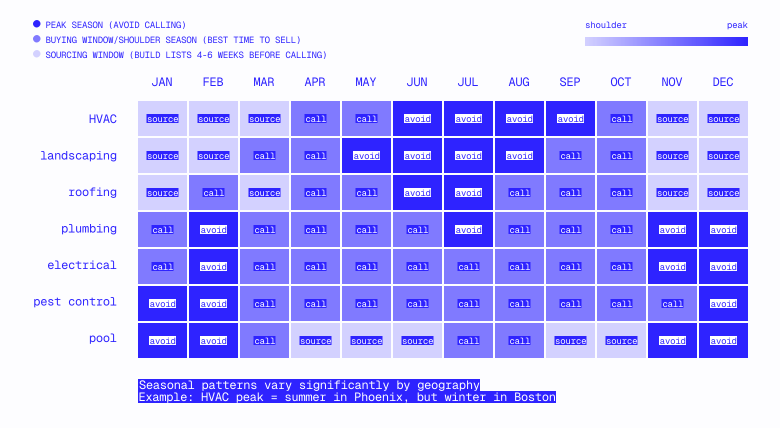
Keep in mind that "shoulder season" differs by trade and geography. We noticed drastically different patterns across five distinct US climate zones (Northeast, Mid-Atlantic, Midwest, South/Sunbelt, West Coast) for when permit activity spikes.
The two-step timing model: source vs. call
The most operationally mature insight we've seen in home services GTM is that sourcing leads and calling leads operate on different calendars, the gap between them 4–6 weeks.
One GTM team described these mechanics: "Before the holidays, we skewed more heavily HVAC—HVAC, electrical, plumbing, not green verticals—and then leading into this period where the thesis was it's a good time to be calling green over the next few months." A shift by early February followed: "We sent over the next batch of accounts, which is focused on landscaping. And then as soon as you guys load those up, you'll be full steam on landscaping."
This reveals a two-step framework:
- Source leads 4–6 weeks before the calling window. Build the list, enrich contacts, prep sequences. For landscaping, that means sourcing in December and January to then call in February and March.
- Call during the buying window. This is shoulder season: when operators are receptive, have bandwidth to evaluate software, and are actively planning for the upcoming peak.
Here’s a practical calendar by trade:
HVAC is the most complex; two peaks (summer cooling, winter heating) create narrow shoulder windows in spring and fall.
One head of growth at a home services SaaS company captured the sophistication this requires: "We should be launching a target campaign at Christmas lights in August."
Note that plumbing and electrical are the exception. Both are relatively non-seasonal (plumbing is emergency-driven, electrical is project-driven), which makes them the backbone of a year-round outbound motion whereas seasonal trades rotate in and out.
Peak season is the wrong time to sell—but the right time to collect signals
Peak season isn't wasted time. It's an intelligence-gathering window during which the signals that predict a good account become most visible:
- Negative reviews appear. Customers posting about missed appointments, long hold times, or "couldn't reach anyone" complaints document operational pain in public. These reviews, telling you exactly which businesses are breaking under volume, are searchable.
- Hiring posts spike. A company posting urgently to hire technicians in the middle of peak season is growing faster than their processes can handle. Job postings for an office manager or dispatcher are even stronger, signaling manual coordination has hit a wall.
- Missed-call patterns surface in review language. Review text that mentions scheduling problems, slow response times, or callbacks that never arrived is pain data hiding in plain sight. These signals are faint during shoulder season when call volume is manageable but light up during peak.
- Career pages appear or update. Businesses that didn't have a career page in March but do in July crossed a growth threshold during peak season.
The operational model: Collect these signals in real time during peak, build scored lists from them, and activate those lists when shoulder season arrives.
This connects directly to the scoring model from Section 1.8. Signals like review volume, career page presence, and hiring activity aren't static; they have seasonal intensity. A negative review posted in July tells you something different than one posted in January. The same signal, read at the right time, carries more weight.
Temporary disqualification: accounts cycle in and out
One of the more underappreciated concepts in seasonal GTM is that disqualification should be temporary.
This requires a GTM system that can park segments and bring them back when timing aligns. Most CRMs and outbound tools don't handle this natively and treat DQ as binary and permanent. The teams that build seasonal cycling into their operations, on the other hand, treat it as a feature: tagging an account with a "revisit date" rather than a DQ status for it to later re-enter the active pool when the buying window opens for its trade.
Failure mode is obvious; teams that don't do this either waste dials calling landscapers in December (low connect, low close) or permanently drop them from the list and re-source them from scratch in February. Both are expensive. Cycling is free—but needs the workflow to support it.
The campaign-first model
The most effective home services GTM teams don't run continuous outbound against a static list; they run what looks more like a marketing campaign calendar, each month with a different vertical focus, messaging, and urgency.
The traditional model is spray-and-pray: load a list of HVAC + plumbing + landscaping + roofing, dial through it, repeat. Connect rates are mediocre, messaging is generic, and the team burns through the list without learning anything about what's working by segment.
The campaign-first model inverts this:
- January: Source landscaping and pest control lists. Messaging: "Getting ready for spring? Here's how operators like you are setting up their season."
- February–March: Heavy dial on landscaping and pest control. Source HVAC cooling-season lists.
- April–May: Shift to HVAC (cooling prep). Collect signals on roofing (storm season approaching).
- September–October: HVAC shoulder season (post-cooling, pre-heating). Source landscaping for winter planning outreach.
- Year-round: Plumbing and electrical as the baseline, non-seasonal backbone.
This model produces two advantages. First, messaging is sharper because it's trade-specific and seasonally relevant; you're calling a landscaper in February about spring prep, not making a generic pitch.
Second, you build institutional knowledge about which trade-season combinations actually convert because you're running identifiable campaigns you can measure rather than a blended average.
One team we worked with was explicit about building this feedback loop by tagging each campaign by trade, tracking results by trade × season, and compounding the learning.
The post-peak window
The data suggests an additional timing concept hasn't been fully validated: the post-peak window.
The logic here is straightforward. During peak season, operators experience acute pain from missed calls, scheduling chaos, and cash flow gaps. They can't act on this, though, because they're buried in work. In the 2 to 4 weeks immediately after peak ends, the pain is still fresh, the season's problems are top of mind, and the owner finally has the necessary bandwidth to take a call and evaluate solutions.
This window is narrower than the full shoulder season. It's the moment between "I'm too busy to talk" and "I've already forgotten how bad it was." If your outbound team can time its first touches to this window—say, late September for HVAC cooling or late October for landscaping—you're reaching an operator whose pain is recent and vivid, not abstract and distant.
This is speculative enough that we'd want to see connect rate and conversion data segmented by week-of-season before treating it as a proven pattern, but the underlying logic is sound: recency of pain drives urgency, and urgency drives buying. Teams that can measure this should.
The implication
Home services outbound is still a volume game with reps needing 80+ dials per day to hit targets and no shortcuts to speak of. What seasonal timing changes is where that same volume is pointed.
Instead of dialing the same list year-round and hoping for connects, you're matching your sourcing rhythm, calling cadence, and signal collection to the natural cycle of each trade. The daily dial target doesn't drop; the waste does.
The teams that do this well build three things: a sourcing calendar that runs 4 to 6 weeks ahead of calling windows, a signal-collection process that harvests pain data during peak, and a temporary DQ system that cycles accounts in and out rather than treating disqualification as permanent. None of these require new tools but instead a different operating model, one of few structural advantages available in home services outbound with most teams still dialing HVAC in July.
1.14 Home services GTM benchmarks
The numbers that matter when selling to home services businesses. Benchmark your own operation and identify where you're leaving performance on the table.
In this section
- Decision-maker connect rate benchmarks
- Coverage benchmarks
- Disqualification rate benchmarks
- Rep productivity benchmarks
- Seasonal adjustment benchmarks
- Using these benchmarks
Decision maker connect rate benchmarks
The single biggest unlock in home services outreach is reaching the right decision maker. Every downstream metric—meetings booked, pipeline generated, closed deals—is bottlenecked by DM connect rates.
Where most teams actually are
Most teams don't measure this correctly.
They report "answer rate" (someone simply picking up the phone) rather than "DM connect rate" (the actual decision maker picking up). Answer rates of 18% are common, but if most of those are office staff, a spouse, or technician on the company line, the real DM connect rate is a fraction of that.
Connect rate by data source
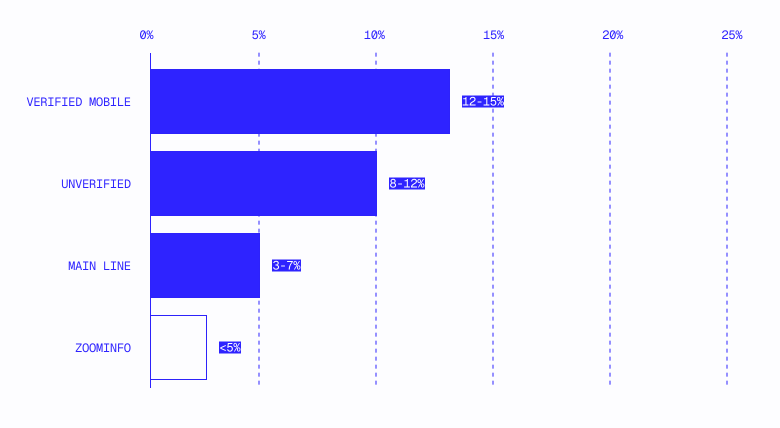
The insight: The gap between 3% and 10% connect rates isn't incremental improvement; it's three times more DM conversations from the same rep on the same day.
One large FSM company measured a 66% increase in DM connect rates across an entire call sequence after switching to verified mobile data. Another hit 8.1% on a 200-contact pilot against a historical baseline its team described as "somewhere between 0 and 1%."
How to measure connect rate (it matters more than you'd think)
Teams measure connect rate three ways, the choice changing the number dramatically:
The per-dial number will always be lowest because it includes every unanswered attempt just as the per-account number will always be highest because it only asks, "Did we ever get through?" Both are valid, but you need to know which one you're looking at when comparing across teams or benchmarking against the numbers in this section.
A common trap: business main lines have a higher answer rate than mobile numbers, but the DM connect rate is lower because you're talking to a receptionist instead of the owner. Teams that report an "18% connect rate" on main lines without distinguishing gatekeepers from decision-maker conversations are measuring the wrong thing.
Coverage benchmarks
What percentage of your target accounts have usable decision-maker contact data?
Decision-maker mobile coverage consistently lands around 64% across recent enrichment pilots with home services companies, the numbers from which are as follows:
The pattern is consistent: ~60–64% for SMB single-location operators, climbing to 80–90% for mid-market accounts with a broader public footprint. Before enrichment, most teams sit at sub-10%; one major company went from 0% to 65% DM mobile coverage on pilot accounts, describing it as an "astronomical difference."
One RevOps leader summarized the gap: "We just signed up with Dun and Bradstreet and they use NAICS or SIC codes which we have found aren't very reliable, and they're pretty broad. The accuracy of the percentage that we actually care about is really small."
One go-to-market leader at a permitting software company described what "working" coverage actually looks like: ZoomInfo plus a workflow automation tool provides contacts for roughly two-thirds of target accounts, with three to five decision makers each.
Of those contacts, approximately 75% have a correct phone number or email—but "one out of every three or four mobile numbers are just incorrect or literally a gatekeeper." That's the best case with a multi-tool stack, and it still means roughly a third of accounts have no usable contacts at all (and a quarter of the contacts that do exist are wrong).
Coverage by vertical
.svg)
CRM coverage vs. actual TAM: Even with specialized data sources, most home services software companies have a fraction of their addressable market in their database.
Across the companies we've worked with, the typical CRM contains 10–15% of the addressable market.
A concrete example: one roofing software company had 11,000 known companies in HubSpot against a TAM of roughly 85,000 roofing accounts—less than 15%— and never realized how large the gap was until it compared the internal count against an independent TAM estimate.
The implication: If you're working from ZoomInfo alone, you're reaching 10–20% of your TAM. The rest is either unworkable or requires manual research at a cost of 5 to 10 minutes per account before a single dial is made, drastically slowing down rep efficiency.
Disqualification rate benchmarks
What percentage of accounts assigned to reps get disqualified?
Home services DQ rates run higher than most verticals for a structural reason: the 287,000-business "Contractor" gray zone.
When your lead list includes generic "contractors" (e.g., kitchen remodelers, commercial construction companies, or handymen), a significant percentage will fall outside your ICP regardless of data quality.
For the full disqualification cascade framework adapted for home services, see Section 1.10: Territory Design.
Rep productivity benchmarks
What should individual contributors actually produce? These benchmarks come from home services software companies with established outbound motions.
SDR/BDR metrics
When the problem isn't data but spam flagging
If your connect rate is below 5% and your data quality checks out (right numbers, right people), the problem may not be your data at all; your outbound numbers may be getting flagged as spam.
STIR/SHAKEN regulations and carrier-level spam filtering have made this increasingly common for high-volume outbound teams. The symptoms are distinctive: connect rates that crater suddenly (not gradually), reps reporting that calls go straight to voicemail even for numbers that previously answered, and dramatically different connect rates across reps using different phone numbers.
How to check:
- Dial your own personal cell with a cell number your reps are using; does it show a spam label?
- Compare connect rates across different outbound numbers on the same team; if one number is at 2% and another at 10%, the low one is likely flagged.
- Check with your dialer provider; most (Orum, Nooks, Kixie) have spam detection dashboards or number health scores.
The manual enrichment drag
Industry data puts BDR time on manual lead research at approximately 40%. At one company selling to small businesses, BDR costs ran $72K per month—meaning roughly $29K per month was effectively spent on research, not selling.
The pre-automation enrichment workflow looks like this:
- Export data from vendor
- Run match against existing leads in Salesforce
- Run match against existing accounts and contacts
- Distribute to reps manually
- Upload to Salesforce
For SMB accounts without websites or LinkedIn profiles—the majority of home services businesses—the per-account research loop (check if real, find owner name, find phone number, verify it works) consumes 5 to 10 minutes before a single dial is made. At 200 accounts per quarter, that's 17 to 33 hours of research per rep per quarter: two to four full selling days lost every month.
Using these benchmarks
These numbers aren't targets to hit blindly. They're diagnostic tools.
If you're below benchmark on connect rate: This is almost always a data problem, not a rep problem. Check: Are you calling main lines or mobile numbers? Is the data verified? Are you timing calls per the right season?
If you're below benchmark on DQ rate (it’s too high): This is a list quality problem. Check: Are you filtering for residential vs. commercial? Are "contractors" being classified pre-assignment? Is the DQ cascade running before or after territory assignment?
If you're below benchmark on rep productivity: Decompose it. Low dials = process or tool problem. Low conversations per dial = connect rate (data). Low meetings per conversation = talk track or qualification. Low close rate = discovery quality or product-market fit. Don't optimize the wrong variable.
If you're above benchmark: Document what's working. It's either a competitive advantage worth protecting (specific data source, specific trade-season timing) or an anomaly worth understanding (small sample, cherry-picked accounts, unsustainable pace).
The two-hour diagnostic
Pull 50 accounts at random from your active rep books. For each one, answer:
- Do we have a verified mobile number for the decision maker?
- Is the business still operating?
- Is the business in our ICP (right trade, right size, residential)?
- Is the business already on a competitor's platform?
- Is this the right season to call this particular trade?
Count the accounts where all five answers are "yes." That's your workability rate—probably lower than your team assumes. Multiply it by your total assigned accounts to get your real territory size.
