

1.1 Why Traditional B2B Sales Doesn't Work for Restaurants
DataLane powers go-to-market strategy for DoorDash, Square, Paychex, ServiceTitan, and dozens of other companies that sell to local businesses. Patterns mentioned here are drawn from real implementations across restaurant tech, home services, retail, wellness, and healthcare sectors.
When we talk to companies that sell to restaurants, our general observation is that much of their GTM motion is inefficient and disjointed.
Reps start their days on Google Maps and go on to find restaurants missing from their CRM. They're spending 30%+ of their time calling restaurants and speaking to hostesses, trying to determine who owns the business because the only LinkedIn contact for Joe's Pizza is a cashier who left in 2021. We’ve also heard of several cases where teams cold call new franchise locations before realizing they’re already customers.
The problem extends beyond data quality and rep training, however, as we frequently see fundamental gaps between the GTM strategy companies are currently executing and the market they're selling to.
The result? You're paying seven figures to subsidize an outbound motion that’s simply running in place. Quotas are missed, reps burn out, and leadership blames execution.
This guide aims to help you identify opportunities to sharpen your outbound GTM motion for restaurants and put a plan in place to execute.
The congruency problem

Kyle Norton, CRO at Owner.com, has a GTM congruency framework speaking to how every element of your go-to-market must work together in harmony: your ACV, sales motion, data infrastructure, and channel mix all fitting each other.
Most companies that sell to restaurants have inherited a GTM motion built for a different market—standard advice on metrics, tools, and playbooks only applying to companies whose decision makers spend their days at a desk responding to emails and LinkedIn messages.
None of it was designed for restaurant owners. The result is a system where your reps find themselves working hard inside a motion never built for the markret they’re actually in.
The GTM congruency test is simple: does each piece of your GTM fit the others?
This guide is about building congruency: aligning every element of your GTM to the reality of selling to restaurants.
Two markets, two realities
The B2B sales playbook that works for selling to tech companies and Fortune 500 enterprises fails systematically when applied to local businesses. The failure happens across three dimensions: reachability, economics, and ICP fit.
The reachability gap
Every major B2B data tool (ZoomInfo, Apollo, Clay, Cognism, Lusha) is architected around the same assumption: decision-makers are on LinkedIn.
For white-collar professionals, this assumption holds. A VP of marketing at a SaaS company, for example, has a polished LinkedIn profile, checks it regularly, and responds to InMail.
Their corporate email follows a predictable pattern ([email protected]).
They sit at a desk during business hours, and are reachable by phone and email.
Restaurant owners operate in a different universe entirely.
The numbers tell the story:
- LinkedIn coverage: 85%+ for tech company employees vs. <20% for restaurant owners
- Connect rates on main line: 3-10% reach the decision-maker
- Connect rates on mobile: 12-18% reach the decision-maker
What "coverage" means: Coverage is the percentage of your target accounts that have usable contact data (especially mobile numbers) for a decision maker. If your TAM has 10,000 restaurants and you can find a working mobile number for the owner at 5,000 of them, you have 50% coverage.
Most accounts are workable at 85% coverage (typical for B2B tech); at 15% coverage (typical of generic tools), most accounts are dead ends. You either skip them or burn time performing manual research.
That's not a marginal difference. It's the difference between functional outbound motion and one that burns through SDR capacity with almost no return.
"The owner of Joe's Pizza isn't on LinkedIn. He's in the kitchen at 11am and doing books at midnight. The entire B2B sales stack was built for people who aren't him."
The economics gap
Reachability is only half the problem. The other half is what restaurant owners can actually afford to pay.
Restaurant economics are brutal. A well-run restaurant operates on 3–9% net margins. While a tech company with 70% gross margins can absorb a $50,000 software contract without much discussion, a restaurant owner is forced to scrutinize every $200/month subscription.
The math here is unforgiving. If your ACV is $3,000, you need to close 150+ deals per rep, per year to hit a reasonable quota. That requires high-velocity sales motion, which depends on efficient prospecting. This brings us back to the reachability problem.
The ICP gap
Even if you solve reachability and economics challenges, you're left with a third problem: your TAM is enormous, and most of it won't convert or translate to workable accounts.
There are 1 million+ foodservice establishments in the US. Your ICP might extend to 200,000 of them, but your sales team can only work 10,000 accounts per year. Which 10,000, exactly?
Restaurant owners don't download whitepapers. They don't attend webinars. They don't leave intent breadcrumbs across the B2B web.
Knowing this, you need a different approach:
1. Aggressive disqualification. A good chunk of your TAM shouldn't be worked at all based on these disqualifiers:
- Closed or closing (17% annual failure rate)
- Already using a competitor with a multi-year contract
- Wrong segment (too small, too large, wrong service model, wrong cuisine)
- Unserviceable location
- No decision-maker contact data
A rigorous DQ process might cut your "workable TAM" from 200,000 to 50,000. That's not a problem. That's clarity.
2. Signal-based prioritization. The accounts worth pursuing show observable signals:
- New restaurant openings (pre-launch or just opened)
- Ownership changes (new buyer, new priorities)
- Expansion signals (permits, job postings, second locations)
- Tech stack gaps (no POS, outdated systems)
- Pain indicators (negative reviews mentioning wait times, order errors)
3. Conversion pattern analysis. Your closed-won deals share characteristics: multi-location operators convert differently than single-unit owners, various cuisines have higher attach rates, and some geographies close faster.
Winning companies don’t work more accounts. They work the right 1,000 accounts with high conviction and ignore the 199,000 that will waste their reps' time.
How this guide is organized
The rest of this guide is organized around solving these three gaps:
Section 1.11: The One-Page Diagnostic helps you assess all three gaps and identify where to focus.
Understanding restaurant decision makers
The VP of marketing at a SaaS company has a LinkedIn profile, checks email hourly, and sits at a desk. The owner of a three-location taco chain does none of those things. Six dimensions explain the gap between these two decision makers—and their implications on your local GTM motion.
1. Availability patterns
Question: When and how can you reach your buyer?
White-collar professionals are generally available during business hours, sitting at a desk while checking email and taking calls. Their calendar is the constraint, but once you get a slot, they show up.
Local business owners have inverted availability:
- During business hours: On-site, customer-facing, unreachable
- Off-hours: Doing admin work, potentially reachable but exhausted
Your SDRs are either calling when no one answers or working non-standard hours.
2. Entity complexity
Question: How hard is it to identify and disambiguate accounts?
Tech companies have clear legal entities, distinct naming, and stable corporate structures. "Stripe, Inc." is Stripe.
Local businesses are much more complex:
- Joe's Pizza" might be "Giuseppe's Italian Kitchen LLC" legally.
- One owner might operate three restaurants under different names to avoid a bankruptcy cascade.
- Franchises create parent/child relationships that break standard CRM structures.
- The "same" restaurant might appear four times in your CRM with slight name variations.
"There's 18 Joe's Pizzas in NYC. When you see a news article about 'Joe's Pizza expanding,' which one is it? That's the entity-resolution problem."
3. Decision-making speed and structure
Question: Can you determine which accounts to prioritize and when to reach out?
In enterprise B2B, intent signals are everywhere: website visits, content downloads, job postings for relevant roles, technographic data showing competitive tools, etc. Platforms like 6sense and Bombora built businesses on these same signals.
Traditional intent signals don't exist for local businesses. Restaurant owners don’t download whitepapers or trigger website tracking pixels, though different signals do exist if you know where to look:
The challenge: these signals require scraping and entity-resolution algorithms on millions of data points via review sites, local news monitoring, and job postings parsed for operational clues.
Tools like Clay offer flexibility for custom scraping workflows, but they're still dependent on LinkedIn for contact enrichment. Building reliable local business signal pipelines, meanwhile, requires vertical-specific expertise horizontal tools lack out of the box. Credit usage per data point also becomes a concern, with tracking across 1M+ locations resulting in seven-figure annual usage bills.
5. Trust deficit and technology skepticism
Question: What's your buyer's default disposition toward sales pitches?
Enterprise buyers are skeptical but professional and expect vendors to pitch them. A well-crafted email or LinkedIn message can get a meeting.
Restaurant owners operate with a deeper skepticism, often earned through experience. We scoured the universe of restaurant software case studies and found tech skepticism as a recurring theme.
The skepticism isn't irrational, with many owners previously burned by vendors who promised the world and disappeared after signing.
One such case involves Tanya, founder of Brixens in North Carolina, who chose software called Micros but found the system not ready for opening day. Tickets began disappearing from kitchen screens, costing $50,000 in comped meals over six months, and the support team vanished.
Technology sophistication also varies wildly. Some owners run multi-location operations with sophisticated tech stacks. Others have never used anything beyond a cash register.
One owner admitted:
"I probably did everything wrong and should have failed. I didn't even understand how tap systems worked."
This creates two implications:
- Trust often matters just as much as features. Here's how one restaurant owner described their SpotOn rep: "When I met John, even before he told me that he had served in the military, I could sense his honor and integrity. We've been working together for over a year now, and my first impression that I could trust and depend on him has proven to be absolutely accurate." The sale happened because of the rapport and trust, not just the product demo.
- Fear of change is real. "Switch to technology can be overwhelming for a business like ours, but my advice is to take the leap." For many owners, switching systems isn't just a business decision. It's genuinely scary and can be a make or break. Your sales motion needs to account for this.
Why this matters for your GTM
Structural differences create two distinct problems you need to solve:
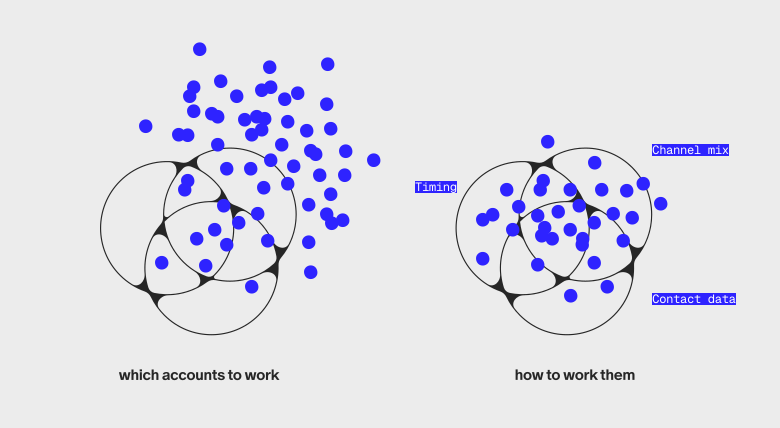
1. Which accounts to work
You can't rely on the account identification and prioritization approaches that work in enterprise B2B:
- Scoring requires different inputs: Review velocity, ownership changes, and competitive signals replace website visits and content downloads
- CRM hygiene is harder: Entity resolution challenges mean your "50,000 accounts" might be 35,000 real businesses with duplicates and variations
- TAM identification is messier: No clean database of "all restaurants in Phoenix". You need to assemble from multiple sources
2. How to work them
Once you know which accounts to target, you must use different approaches to reach decision makers:
- Contact data sources: LinkedIn-based tools fail; you need sources built for local conditions (mobile numbers, not office lines).
- Channel mix: Email alone won't cut it; phone and direct mail are more effective with email as a complement.
- Timing: Calling during business hours means reaching staff, not owners; early-morning or late-evening windows are necessary.
- Coverage expectations: 50-60% decisoin maker contact coverage is excellent; don't expect the 80%+ achieved for tech companies.
Measuring the gap
If you suspect traditional B2B GTM is broken for your market, don't guess. Measure it. Section 1.11: The One-Page Diagnostic includes a two-hour test to quantify your coverage gaps, connect rates, and the hidden cost of research time.
Quick reference
Structural gaps
The ACV vs. research time trap
At $3k ACV: 150+ deals/year needed → ~3 deals/week → no time for research.
At 15-20% coverage: 80-85% of accounts have no usable contact data.
Options:
— Skip no-data accounts → TAM shrinks to 15-20%;
— Manual research → 20-60% of selling time lost;
— Neither works. You need better coverage or higher effective ACV.
The implication
That busy taco spot with great reviews? Your SDR will never reach the owner using the tools that work for tech companies, not because your team isn't trying hard enough but because the infrastructure doesn't exist.
The standard B2B playbook assumes two things: decision makers are findable online, and deal sizes justify the cost of finding them. For restaurants, neither assumption holds. LinkedIn-based tools fail on reachability, and low ACVs can't absorb the research time low coverage forces. The math breaks before your reps have a chance to make their first dial.
Winning companies (e.g., Toast, DoorDash, and ServiceTitan) don’t execute the standard playbook better but simply recognize that selling to local businesses is a fundamentally different problem requiring new infrastructure: different data sources, signals, campaigns, channel mixes, and economics.
1.2 The Economics of Selling to Local
This section begins Part 2: The Economics Gap: does the math work? Before worrying about ICP or reachability, the unit economics have to pencil out.
Why field sales works for local (and when it doesn't)
Many companies default to field sales—because "that's how it's done" in local—without running the numbers or questioning whether this strategy is necessary. The ones who succeed understand both the economics and the strategic rationale.
If you're building a sales motion targeting local businesses, you've probably debated how to allocate resources for field vs. inside sales. Companies like Toast, DoorDash, Square, ServiceTitan, and Paychex all have reps who drive to restaurants, clinics, and storefronts alongside significant inside sales teams. Yet, plenty of companies have tried field sales and failed.
One workforce management company shut down a 35-person field team, for example, just as an online ordering platform pivoted to inbound. The same story echoes across the industry: "The big players can make field sales work, but we couldn't." That's 18 months and millions in fully loaded costs spent learning what the math could have told them upfront.
The difference isn't execution. It's economics. Understanding the math behind field sales, specifically when it works and when it doesn't, is essential for anyone building GTM for local businesses.
The field sales math
Here's the reality of field sales economics based on how top performers actually operate.
Capacity is higher than you'd think (if you do it right)
A well trained field sales rep can close ~75-80 deals per year. Here's how that breaks down:
Based on a Toast Territory AE's workflow (disclosed publicly):
- Field days: 2–3 days per week (remainder is calls, admin, customer success)
- Prospect visits per field day: 6–9 visits
- Sales cycle: ~3 weeks for SMB (quick owner decision , no committee)
- Meetings per deal: 2–3 (discovery, demo, close, often compressed)
- Win rate: ~25–30% (typical for field sales to SMB)
"As a Senior Territory Account Executive, I manage the entire sales cycle from initial contact to close... I met with 9 prospects of varying restaurant types throughout the day... I'm typically in the field two or three days a week."
Toast Territory AE,
Atlanta metro
An inside sales rep has even more capacity: ~300+ deals per year, roughly 4x more throughput.
Inside sales wins on pure efficiency at every price point. So why does anyone even use field sales, then? Because efficiency isn't the only variable; trust, social proof, and relationship depth matter in local sales. Let's explore when field economics actually works…
The breakeven question
"What monthly subscription price makes field sales viable?"
Pure subscription model
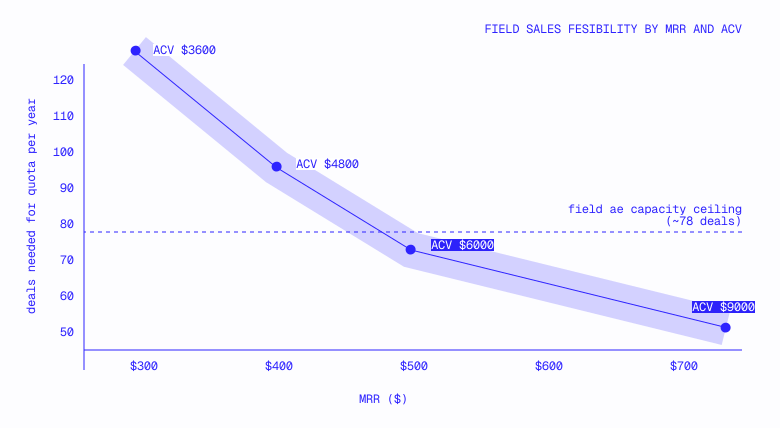
Break-even point: $400–500/month MRR for pure subscription.
Below $400, field reps can't close enough deals to hit quota. At $500+, the math works—but inside sales still has better unit economics.
With payment processing
Add payment processing revenue and the math shifts further:
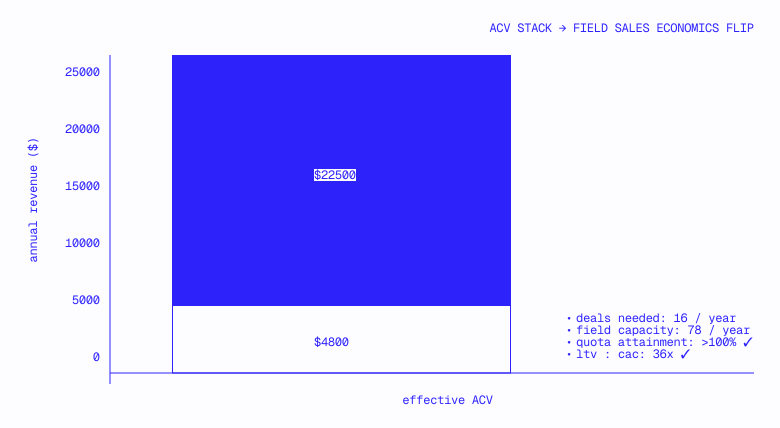
The break-even point drops to $200–300/month MRR with payment processing.
This is why Toast, Square, and Clover can turn a profit running field sales at subscription prices that would be thin otherwise. Payment processing isn't a nice-to-have; it’s the economic engine making field motion sustainable.
Implications and takeways for your GTM motion
1. Every hour of research is an hour not selling
Field reps only have ~20–25 hours of prospect-facing time per week (2.5 field days × 8–10 hours). If your reps spend 5 hours weekly researching contacts, you're losing 20–25% of their selling capacity. That's the difference between 78 and 90+ deals per year, per rep.
"Sometimes the reps are spending like half the day on Friday preparing for the next week, trying to figure out who the owners are for the restaurants."
RevOps leader
at a restaurant management software company
Contact data quality matters more for field sales than inside sales. While inside reps can research between calls, field reps are either in meetings or driving. There's no in-between time.
We've seen inside teams spending half their dials simply gathering intel for the field sales team: "What POS are you using? Who handles that decision?"
Why pay your GTM team to gather intel that should have been in the CRM to start? Winning teams arm reps with this context before the dial, so they're selling—not surveying.
2. Hyper-local social proof requires hyper-local data
Field sales to local businesses runs on social proof, not generic case studies, and nearby references cited by first name.
Jonathan Vassil, CRO at Toast, on what drove their field sales success:
"The number-one factor early on in who would buy Toast was their proximity to another Toast customer. We did the multivariate regression... Every time we're having a conversation with a prospect, what our team is trained to do is reference a nearby Toast customer. 'Oh Mark, I see you're on TouchBistro. That's awesome. You know Joey over here? Susan just switched from TouchBistro.' That just goes so far. That gets you a half an hour with them."
Jonathan Vassil,
CRO at Toast
This is incredibly effective yet incredibly hard to operationalize. To run this play, your reps need:
The implication: field sales data requirements go beyond prospect contact info. You also need rich, geo-indexed data on your own install base: owner names, locations, and the ability to query by proximity. Most companies don't have this, which means their field reps can't run the social proof play that makes Toast's model work.
3. Three paths to profitability
Companies selling to local businesses have three paths to making field economics work:
Path A: Moderate-to-high subscription price ($500+ MRR)
- Restaurant management software
- Healthcare SaaS
- Multi-location focused tools
Path B: Payment processing or transaction revenue
- Toast, Square, Clover
- Payroll processors (Paychex, ADP)
- Anyone with a "take rate" on transactions
Field sales may still work if you’re not on one of these paths, but you need a clear strategic reason beyond pure economics since inside sales is more efficient.
Path C: Make inside sales work instead at high efficiency
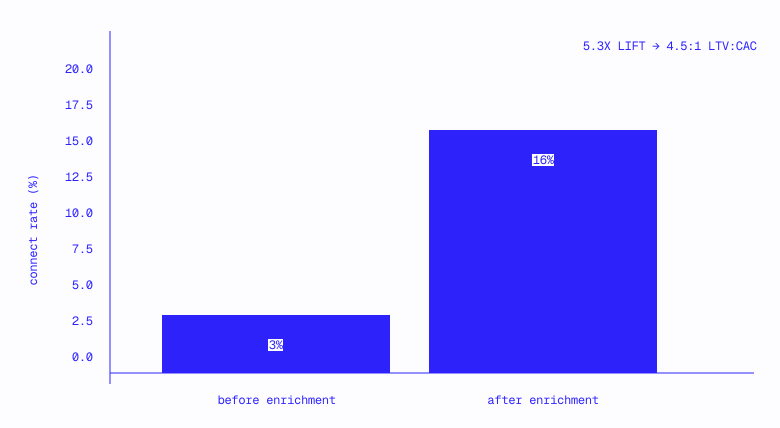
Kyle Norton, CRO at Owner.com, scaled from $2M to $40M ARR using inside sales to restaurants, no field team. His take on the economics:
"Don't bother hiring more than one or two BDRs until you figure out the data piece, because the economics just won't make sense."
Owner.com operates at 4.5:1 LTV:CAC with its inside model, data enrichment boosting connect rates from 3% to 16%. This is often the more viable path for companies lacking payment processing revenue.
4. The metrics that matter
If you're running field sales, these are your constraints:
Red flags: When field sales economics don't work
If you're seeing these patterns in your own org, it's worth revisiting whether field sales is the right motion:
- Subscription < $400/month with no transaction revenue: The math gets very tight
- Sales cycles > 6 weeks with ACVs < $10,000: Capacity constraints kill quota attainment
- Territory too spread out (1+ hour drives between meetings): Travel eats into visit capacity
- Reps in the field 4-5 days/week: They're likely neglecting pipeline management and follow-up
- Fewer than 5 prospect visits per field day: Territory design or qualification problem
These aren't always execution problems and are often structural. The solution, likewise, is perhaps not better training but reconsidering territory design, pricing, or the motion entirely.
The field sales decision
The economics test is straightforward: Can a rep close enough deals per year to hit quota at your ACV? With ~78 deals/year capacity (Toast-level execution), the math works at $500+ MRR for pure subscription or $300+ MRR with payment processing.
The harder question: Even when field sales is economically viable, inside sales is almost always more efficient on a per-deal basis. So why use field at all?
The answer is strategic, not purely economic:
- Trust: Restaurant owners are skeptical of cold outreach. Face-to-face builds credibility faster.
- Social proof: The "Joey down the street uses us" play only works when you're physically in the neighborhood.
- Competitive displacement: Unseating an incumbent POS often requires a demo at their location.
- Complexity: Some products need hands-on setup or training that remote can't replicate.
If none of these apply to your business, inside sales is probably your motion even if field sales "works" economically.
To measure whether your current motion is working, run the One-Page Diagnostic in Section 1.11. It will show you how much time reps spend researching vs. selling, critical for field teams where every hour of research is an hour not in front of customers.
Quick reference
Field benchmarks based on Toast Territory AE operating model (2.5 field days/week, 6+ visits/day, 3-week cycles).
1.3 Compensation Benchmarks for Restaurant GTM Roles
Toast pays $175k OTE for SMB AEs. Owner.com pays $110k. Both companies are crushing it.
Toast's payments revenue funds higher base salaries. Owner.com's GTM infrastructure drives higher attainment, making lower OTEs competitive on actual earnings. DoorDash's commission economics create variable upside that smaller companies can't replicate.
This section shares compensation benchmarks across the major restaurant GTM players, and the operating models that explain them.
Data Source
This section is based on self-reported, publicly accessible data on RepVue Sample sizes noted in tables.
Compensation by Company
POS & Payments
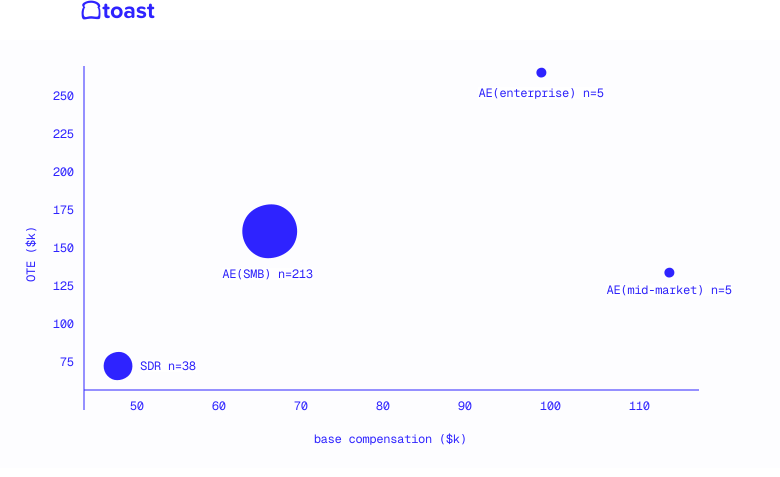
$175k SMB OTE is highest in dataset, payments revenue subsidizes sales comp that pure SaaS can't match.

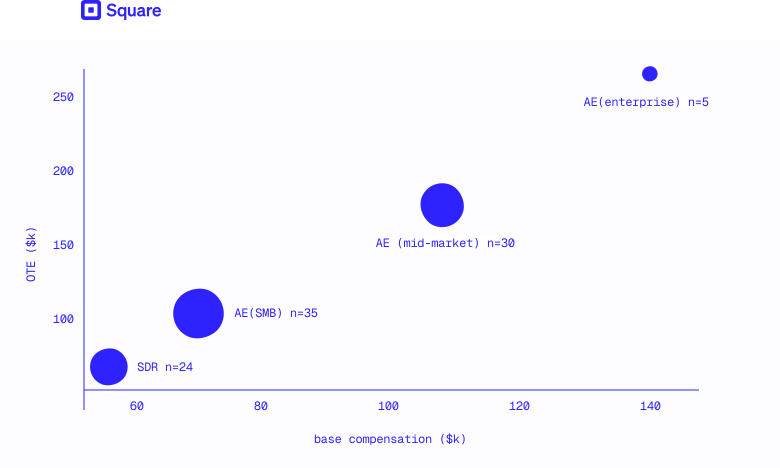
70% base ratio (vs. 37% at Toast) reflects product-led motion where sales closes inbound, not outbound.
Online Ordering & Delivery
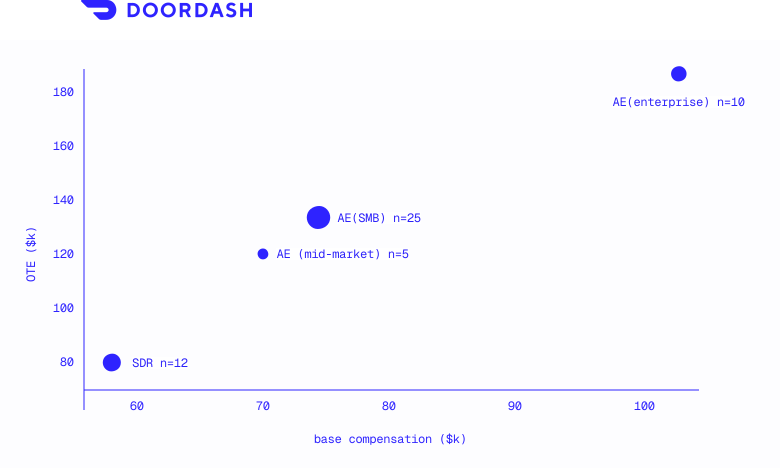
Comp is middle-of-pack despite market dominance, brand and inbound volume reduce need to pay up.
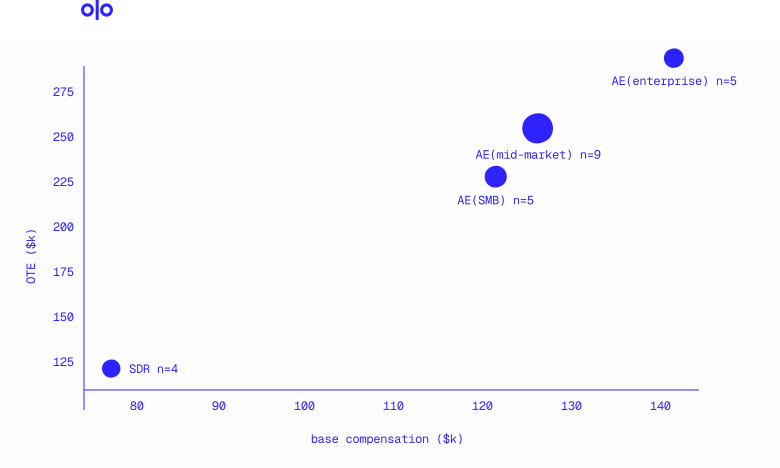
Caution: $240k SMB OTE is misleading benchmark. Olo is enterprise-DNA company, their "SMB" deals and sales cycles aren't comparable to high-velocity SMB motions.
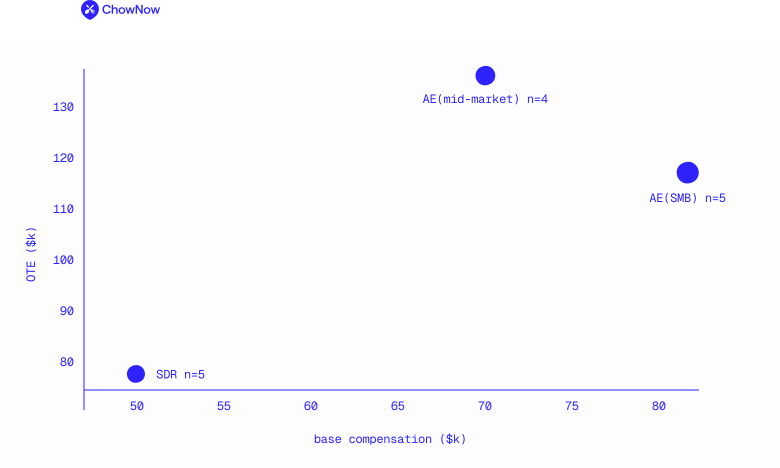
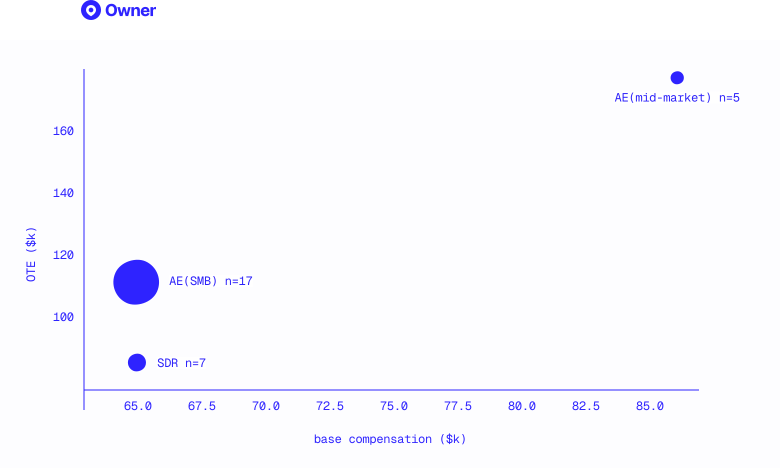
$110k SMB OTE is 37% below Toast ($175k), yet Owner.com is scaling a high-velocity SMB motion. Their edge: GTM infrastructure that drives efficiency, not comp.
Back-Office & Operations
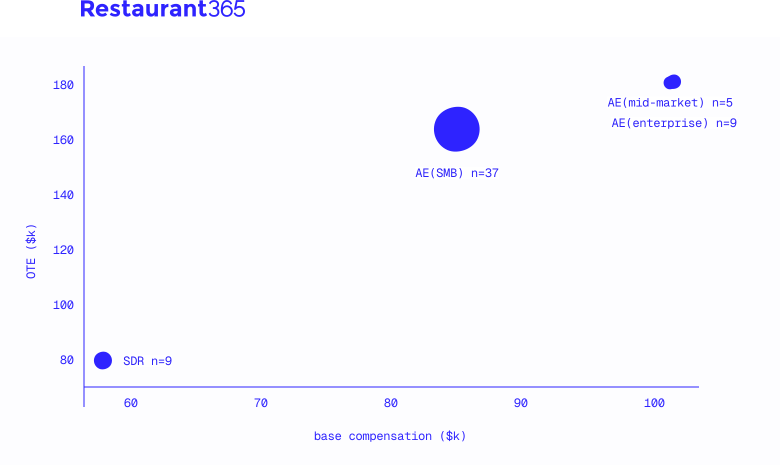
Workforce Management
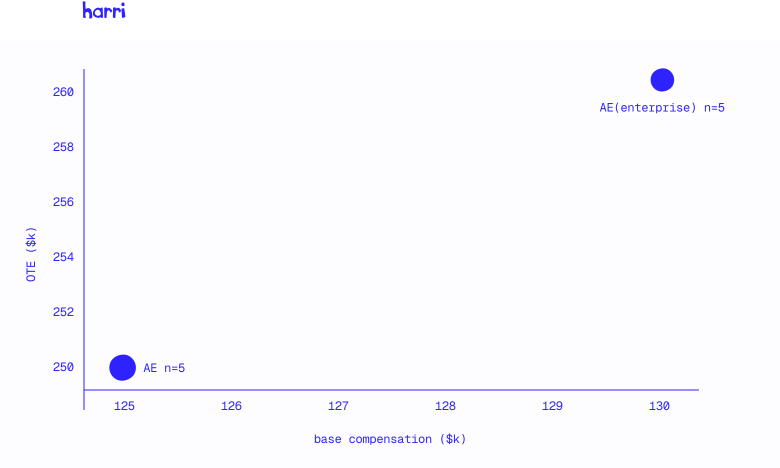
Compensation by Role Type
SDR/BDR Roles
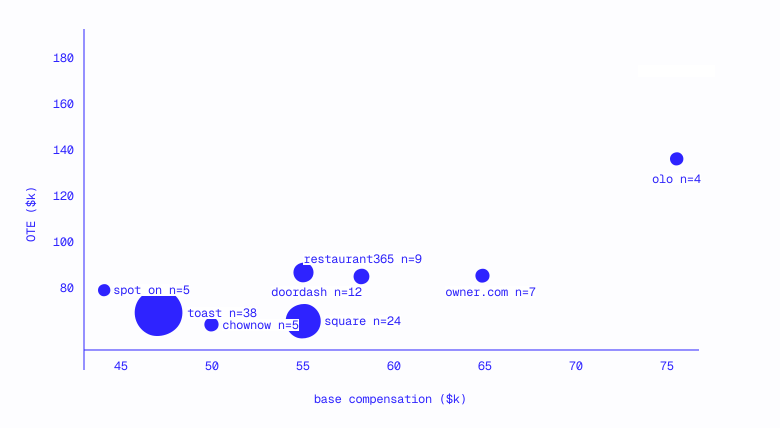
Account Executive Roles (SMB)
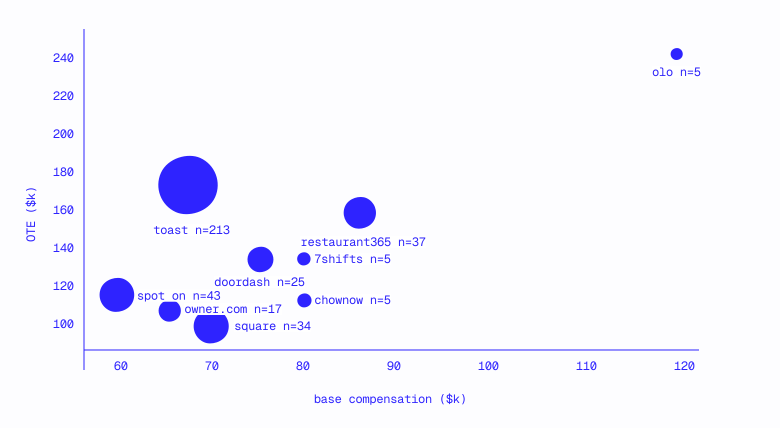
Account Executive Roles (Mid-Market / Enterprise)
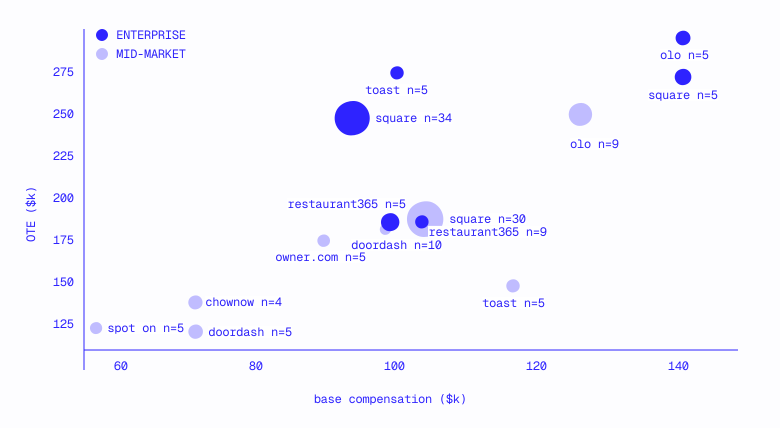
The Real Question: What's Your Edge?
Every company that's winning on talent has a theory explaining why they’re able to do so. The comp data above only makes sense when you understand the underlying economics.
Toast: Payments Profit
Toast pays $175k OTE for SMB AEs, $45–65k above peers selling to the same restaurants. Post-interchange, Toast nets ~48 basis points on ~$1M annual payment volume per location (roughly $5k/year in payment profit on top of SaaS subscription revenue). This margin funds a comp structure pure SaaS companies can't match.
DoorDash: Commission Economics
DoorDash's SMB OTE ($130k) looks mid-pack until you understand the corresponding unit economics. The company takes 15–30% in commission on every delivery order. A restaurant doing $50k/year through DoorDash at 25% commission generates $12.5k in revenue, 2.5x Toast's payment profit per location. With DoorDash’s 67% market share in US meal delivery, restaurants need to be on the platform: the sales motion proving incremental value to warm prospects, not cold outbound leads.
Square: Product-Led Scale
Square pays the lowest SMB OTE ($100k) but the highest base ratio (70%), reflecting its 4 million merchant scale and product-led motion, self-serve merchants, and sales closing warm leads. The 70% base attracts closers who want stability; the lower OTE works because the pipeline is healthier and the CAC lower.
Owner.com: GTM Infrastructure
Owner.com pays $110k SMB OTE, 37% below Toast, 15% below DoorDash, yet they're scaling a high-velocity SMB motion effectively. The difference: 71% quota attainment.
Quota Attainment vs SMB OTE
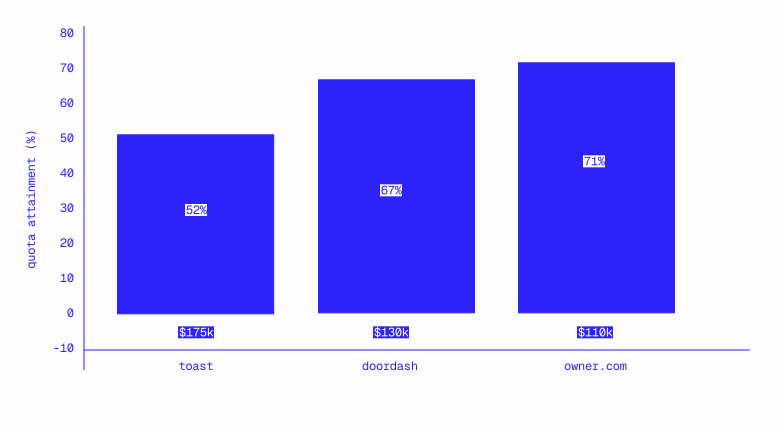
Owner.com's bet: invest in GTM infrastructure (data, tooling, process) so reps close more efficiently. Lower OTE, higher attainment, and competitive W-2s are part of this.
The Implication
The range is $100-175k for SMB AEs. Where you land depends on one question: what's your edge?
If you have payments economics, you can pay at the top. If you have product-led inbound sales at scale, you can offer stability over upside. If you have GTM infrastructure that drives attainment, you can pay below the market average OTEs and still attract talent because every rep knows they will go beyond their quotas.
The question for every GTM leader is: What's your theory, and can you articulate it to candidates?
1.4 Restaurant GTM Signals
This section begins Part 3: The ICP Gap: Are you working the right accounts?
With 1M+ restaurants and limited rep capacity, finding the accounts most likely to convert is the difference between scalable motion and an expensive experiment.
B2B intent vendors built an entire industry on flimsy signals: a prospect visited your website, downloaded a whitepaper, and clicked an ad. Such signals rarely improve win rates and are unreliably sourced.
Restaurant signals work differently. A spike in reviews mentioning delivery complaints maps to operational pain. Job posts mentioning POS familiarity reliably indicate which POS a restaurant is using.
Restaurant signals are transparent and reliable, layered together to inform which accounts you should be working and how to work them. Let's dive in.
What makes a signal "transparent"

Transparent signals map to observable behavior linked to business opportunities:
- A restaurant files for a liquor license at a second address (they're expanding).
- Job postings appear for "kitchen manager" and "assistant GM" (they're scaling).
- Reviews mentioning delivery complaints triple over 3 months (fulfillment is fractured).
- A new LLC is registered with new officers (ownership is restructuring).
These are evidence of decisions made, pain experienced, and/or changes underway. You can verify them and build a thoughtful campaign around them.
Why this matters for scoring
When you build prioritization around transparent signals:
- Reps trust the process because they can verify it.
- Conversations have context since signal transparency supports tailored talk tracks.
- Failures are diagnosable given your ability to know which signals to focus on vs. ignore.
- Models improve because inputs are auditable.
Black-box intent scores ("This account is 82% likely to buy") don't offer any of this.
What follows are four categories detailing transparent signals, how to combine them, and how to build a motion around observable behavior.
Four signal categories
1. Timing signals: When to reach out
Timing signals indicate moments when a restaurant is more likely to make purchasing decisions.
New restaurant openings are particularly valuable, restaurants in a pre-open or just-launched phase actively building their tech stack. Every vendor has a chance. Six months post-open, restaurants have made their choices, and switching costs kick in.
Location count as a timing signal: Restaurants hit predictable breaking points as they scale. Each threshold creates acute operational pain and openness to new solutions.
2. Pain signals: Why restaurants might be ready for change
Pain signals surface operational problems indicating receptivity to solutions.
Review mining at scale can identify restaurants experiencing specific operational pain. A restaurant with 15 recent reviews mentioning delivery problems, for example, is a better target for a delivery-optimization solution than one with no such mentions.
3. Competitive displacement and integration signals
These signals indicate the technology a restaurant currently uses and potential readiness to switch.
Tech stack as a qualification signal
For many restaurant tech products, tech stack detection isn't just competitive intelligence but basic qualification. If your product only integrates with Toast and Square, for example, a restaurant running Aloha isn't in your serviceable TAM at all.
Section 1.7: Tech Stack as a Qualification Signal covers this in depth: how to use POS data for hard vs. soft qualification, the nuances of platform lock-in, and how to operationalize tech stack data in your motion.
4. Growth and capacity signals: Who can afford to buy
Growth signals point to restaurants with the capacity and budget to invest in solutions.
The cuisine complexity signal
One underexplored signal we've noticed is cuisine type, predicting operational pain points and sometimes indicative of strong-fit accounts. Here's an example from a case study that stood out to us:
Xi'an Famous Foods, a 12-location NYC chain known for hand-pulled Shaanxi noodles, explained why they needed scheduling software:
"Xi'an is a very lean business with little waste and requires specialized labor due to the traditional dishes served."
This matters because specialized cuisine creates compounding workforce challenges:
- Smaller talent pool: Not everyone can hand pull noodles or make proper sushi rice.
- Higher training costs: It takes weeks or months to develop specialized skills.
- More painful turnover: Losing a trained specialist hurts more than losing a line cook.
- Scheduling complexity: You need the right skilled people at peak times.
Cuisine complexity as a scoring input
The GTM implication: Restaurants serving cuisines that require specialized preparation, hand-pulled noodles, omakase sushi, authentic regional dishes, craft pizza with long fermentation, likely have higher pain around workforce and may be more receptive to solutions that address it.
Building a signal-based scoring model
Combining signals creates a prioritization score that outperforms basic filtering, how you build the model mattering as much as the signals themselves.
Two types of signals
Before diving into scoring maturity, it's worth distinguishing the two types of signals you'll work with:
Both are signals; the difference is what they predict. While qualification signals define your TAM and segment your accounts, timing signals indicate when an account will likely be receptive. The best scoring models layer both.
The scoring maturity ladder
Most teams evolve through predictable stages:
Stage 1: Shotgun approach No scoring. Random selection from a list. "Let's just call some restaurants."
Stage 2: Qualification signals only Basic filtering on qualification signals (location count, cuisine type, geography). Better than random, but only predicts fit—not readiness.
Stage 3: Qualification + timing signals Layering qualification signals with timing signals (job postings, permits, review trends) and competitive signals (current POS, online ordering presence). Predicting who's ready to buy, not just who could buy.
Stage 4: Transparent, multi-factor models 20+ features with visible weights. Reps can see exactly why an account is high priority and use this context in conversations. Scores inform campaign segmentation, not just prioritization.

The rest of this section focuses on Stage 4, why transparency matters and howto build for it.
Why transparency matters
Transparent signals have an operational advantage over black-box intent scores: they're auditable.
Build scoring models where every input is visible. When an account scores high, anyone can see exactly why, and adjust their approach accordingly.
Explainability as a feature
A transparent signal model doesn't just tell you which accounts to call but what to say when you call.
The transparent version isn't just more trustworthy but also more actionable. Signals become conversation starters, not just prioritization inputs.
Building for auditability
When constructing signal-based prioritization, design for explainability from the start:
- Show the input factors: Reps should see exactly why Account X is a high priority.
- Make the logic visible: What signals are you tracking? How do they combine?
- Log signal sources: When did this data update? Where did it come from?
- Enable feedback loops: Reps should flag when signals don’t match reality.
- Iterate based on outcomes: Track which signals actually correlate with conversions.
Transparent signals enable better campaigns
Beyond rep conversations, transparent signals unlock campaign segmentation that black-box scores can't support.
The operational advantage: When you know why accounts are prioritized, you can build targeted campaigns with messaging matched to the signal as follows.
With a black-box intent score, you can't do this. "Intent score 85" doesn't tell your reps what campaign to enroll the account in or what message will resonate
Campaign operations becomes possible when you:
- Segment accounts by primary signal, not just score
- A/B test messaging and scripts by signal type to find what converts
- Measure conversion rates per signal cluster to learn what actually predicts
This closes the loop between data and execution. Signals don't just prioritize; they inform the entire campaign motion.
Example: Workforce management solution signals
A restaurant with multiple timing signals is a better target than one with identical qualification signals but no timing indicators, regardless of how you weigh them.
Example: Online ordering solution signals
Layering signals
Individual signals are useful but can be noisy in isolation. Layered signals are powerful. In restaurant GTM, signal volume makes layering possible.
If you tried to layer multiple intent signals (e.g., "Visited pricing page AND downloaded whitepaper AND attended webinar AND searched competitor terms") in enterprise B2B, you'd end up with account lists of one. The signals are too sparse to combine, meaning you're stuck using single signals as flimsy prioritization inputs.
Restaurants generate observable signals with a volume high enough to layer without shrinking your list to nothing. "Filed expansion permit AND posting for management roles AND increasing review velocity" still returns hundreds of accounts. That's actionable. You can run campaigns against it and build scoring models that need multiple signals to fire.
The real opportunity is combining multiple signal types, mixing third-party signals with first-party data.
Third-party signal combinations
Some signal combinations are stronger than the sum of their parts:
The principle: Look for signals that corroborate each other. A hiring surge alone might be seasonal, but one plus review velocity and expansion news suggests a restaurant that's genuinely scaling.
First-party expansion and upsell signals
First-party data becomes your most valuable signal layer for existing customers, giving you visibility competitors lack.
First-party and third-party signal combinations
The most powerful upsell signals layer internal data with external context:
The operational implication: Signal correlation should happen in your data warehouse, not manually by reps. The warehouse combines signals from multiple sources, computes the insight ("expansion likely + at-risk"), and that computed field flows to the CRM on accounts being worked. If reps have to cross-reference Salesforce with LinkedIn with Yelp, it won't happen consistently.
Building a signal-layered motion
- Aggregate signals in the warehouse. This is where third-party signals (reviews, job postings, permits) combine with first-party data (product usage, support tickets, renewal dates).
- Compute combined insights. "Expansion likely," "At-risk," and "Active evaluation" are fields that can flow to any downstream system.
- Push to CRM for working accounts. Reps see the computed signal, not raw data they need to interpret.
- Route to the right motion. Delineate as “expansion,” “retention,” or “cross-sell” based on signal combination.
- Measure by signal cluster. Beyond just overall conversion, learn which combinations actually predict.
For net-new acquisition, the logic inverts: start with third-party signals in the warehouse to identify and prioritize targets, then pull high-priority accounts into the CRM for reps to work.
Why signal aggregation is hard
No single source provides complete signal coverage. Building a useful signal layer, likewise, requires aggregating across all of these: normalizing formats, resolving entities, and refreshing fast enough to catch ideal timing windows.
This is why most teams either invest heavily in internal infrastructure or work with vertical-specialized data partners, knowing horizontal tools aren't built for this.
Where signals fit in the prioritization stack
Qualification signals are necessary but insufficient. Two restaurants can look identical in this respect—same location count, same cuisine, same revenue band—yet one just filed an expansion permit with hiring posts up while the other has stayed stable for three years with no such activity.
The latter is a fundamentally different opportunity; timing signals are what separate "could buy" from "ready to buy."
Quick reference: Signal categories
1.5 Restaurant Tech Stack as a Qualification Signal
We have seen reps waste days chasing an account that will never close. Why? Because their company's software does not integrate with their existing POS.
Tech stack data isn't just nice-to-have context for scripts. It's a qualification signal that determines fit, competitive positioning, and whether the deal is even possible.
Why tech stack matters for restaurant GTM
1. Product fit. Does your solution integrate with what the restaurant already has? A workforce management tool that doesn't connect to the existing POS is a non-starter. An online ordering platform that conflicts with an existing DoorDash contract won't close.
2. Competitive displacement. Knowing the restaurant’s current vendor tells you how to position. Selling against Toast is different than selling against a legacy Aloha system. Selling to someone on Homebase? Different than selling to someone still using paper schedules.
3. White space identification. What's missing in its stack? A restaurant with POS and online ordering but no loyalty program presents a different opportunity than one with the full suite.
4. Budget reality. Restaurant software budgets run $600–6,000/year for most operators. If they're already paying for POS, scheduling, online ordering, and inventory, no remaining budget may exist for your category.
5. Sophistication signal. Section 1.1 established that technology sophistication varies wildly among restaurant owners; tech stack reveals where prospects fall on this spectrum. A restaurant using Toast POS, 7shifts, and MarketMan is "digitally forward" and understands software value. A restaurant with no visible tech presence, on the other hand, requires more education, more hand-holding, and a longer cycle.
The data points that matter
"Rather than getting 20 possible data points where we're not sure... It's really hard to track 20 accurately over time. A lot of them end up not having an impact. It's actually just narrowing down the things that matter most."
Most teams track too many variables. Pick the 2-3 that predict conversion for your product:
The hard part: Unlike enterprise tech stacks (visible on job postings, technographic tools), restaurant tech stacks are largely invisible. The POS might be visible through the window, but everything else requires a conversation or specialized data sources.
Using tech stack in your motion
Start with disqualifications
"I think about it as a pyramid with disqualifications at the bottom, better fit accounts in the middle, and then custom signals and intent at the top. You start bottom up."
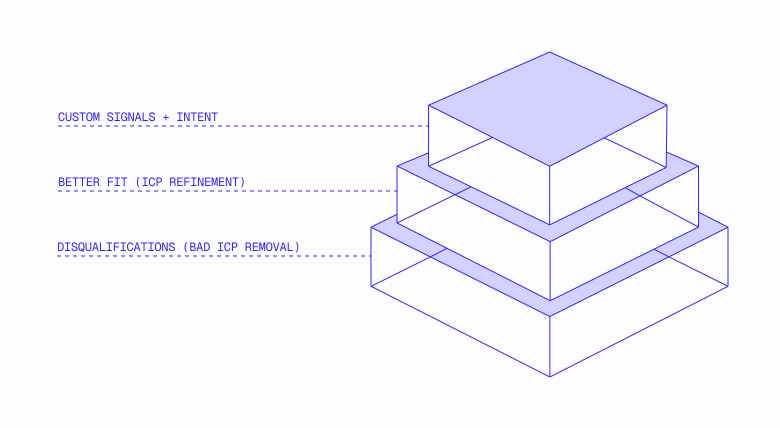
Before chasing sophisticated scoring, use tech stack for basic fit:
- No integration path with their POS? Disqualify.
- Recently signed with a competitor? Long-term nurture, not active pursuit.
- Missing your category entirely? Education-heavy sale, budget time accordingly.
For positioning
- Legacy system (Aloha, Micros) → "modernization" angle, support emphasized
- Competitor (Toast vs Square vs SpotOn) → know the switching pain points
- Spreadsheets/manual → "first real solution" positioning, expect change resistance
For discovery
- "What are you using for [category] today?" reveals maturity and fit
- "How's that working for you?" surfaces pain without leading
- "What does your full stack look like?" uncovers integration complexity
The consolidation context
The restaurant tech market is consolidating. Toast, Square, and SpotOn are all expanding beyond POS into workforce, online ordering, and loyalty. This creates two dynamics:
1. Platform lock-in is increasing. Operators who buy Toast POS often add Toast Payroll, Toast Online Ordering, and Toast Loyalty. Displacing one piece of the stack gets harder accordingly.
2. Best-of-breed still wins in categories. 7shifts remains the scheduling leader despite the entry of Toast. ChowNow and Owner.com win direct ordering despite marketplace dominance. Specialization matters where the platform play is "good enough" and not “great.”
The implication
Tech stack isn't background research. It's a qualification signal as important as location count or revenue. The companies that capture and use this data systematically—knowing what each account runs, where the gaps are, and which vendors are vulnerable—close deals their competitors never saw coming.
Tech stack data also reveals something deeper: market structure. Toast dominates nationally, but Menusifu owns 84% of Flushing and Clover owns 45% of East Flatbush. These patterns aren't random outliers but wedges where challengers built density the incumbent can't match. Section 1.8 explores this pattern in depth including how to identify wedges, why they form, and what they mean for territory design and TAM accuracy.
1.6 Territory design must factor in data quality and market structure
This section focuses on the upstream problems most teams skip, with a need to ensure the accounts you're planning around are actually workable and understand which are structurally unreachable.
Reps are assigned 500 accounts, yet a significant portion can't convert: some due to dirty data (unserviceable locations, missing contacts, competitor locks) and others because they're in micromarkets where a focused challenger has built impenetrable density.
This section covers what "workable" means for restaurant accounts and how market structure creates wedges that affect territory viability.
Real example: Miami TAM evaluation for our vendors
When a customer asked us to evaluate its Miami TAM data, we found 39% of records in its Miami account list were useless as the business was either:
- Permanently closed
- A non-restaurant entity
- A duplicate of other records in the list
- Not in existence at all
These weren't flagged accounts but instead part of an active territory list reps were currently working.
In a subsequent pilot, then, we identified 9x the number of verified, callable restaurants in the company’s Miami territory: not incremental improvement but a step function difference.

1. The ICP gap
Most territory planning begins with account count: "We have 5,000 accounts in the Southeast region. Divided by five reps, that's 1,000 accounts each."
That math assumes accounts are interchangeable and equivalent. For restaurant GTM, this could not be more incorrect.
What makes an account "workable"?
Cumulative impact: A "5,000-account territory" might be a 1,200-account territory after filtering. If you don't know this before planning, you're setting quotas against phantom TAM.
The quick test: One Page Diagnostic
2. Disqualification cascade
Territory planning should start with a disqualification of unworkable accounts, your team avoiding working accounts that will never close or simply don’t exist at all.
The cleanup checklist
The standard we see: Teams working with clean data hit sub-5% disqualification rates on assigned accounts whereas those that skip this step run 10–30% DQ rates, wasting up to a third of rep activity before they even dial.
Example cascade output
These figures are illustrative; your numbers will vary by product and market. The value is in running the cascade, not hitting specific percentages.
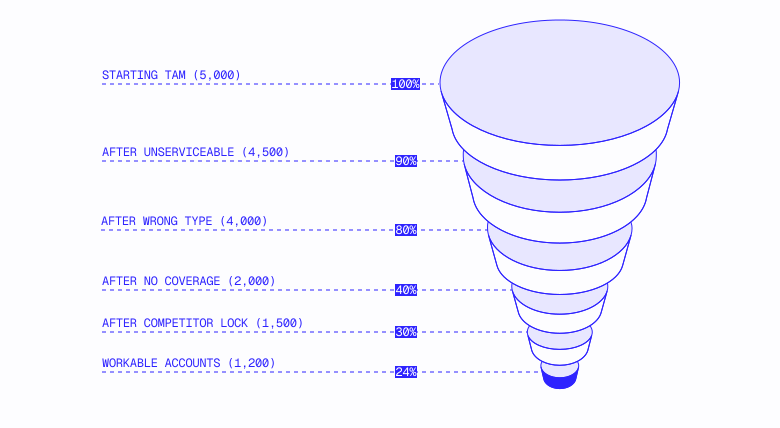
The implication: Your "5,000-account territory" is perhaps a much smaller workable territory, the exact numbers varying by product and market but the pattern consistent. Territory planning that skips this step sets reps up to spend significant time on accounts that can't convert.
Disqualification criteria vary by product
Different products have different disqualification rules:
Build product-specific disqualification rules, and apply them prior to territory assignment.
3. Bespoke signals that affect territory assignment
Signals that actually impact territory account selection are often vertical-specific (and sometimes company-specific).
Example: Deliverability tagging
One delivery platform we worked with needed to know whether each restaurant location was actually "deliverable," defined by answering “no” to these questions:
- Is it inside a mall?
- Is it inside a casino?
- Is it inside a military base?
- Is it inside an airport?
The platform’s offshore BPO team was manually categorizing these but couldn’t keep up with millions of records and hundreds of thousands of openings and closures annually.
Impact on territory assignment: Deliverability isn't uniformly distributed. The DC/Virginia area, for example, has more military bases than other territories. Some metros have more mall-based restaurants than others. A territory that initially appears equal on account count might have a dramatically different number of workable accounts after you filter for deliverability.
Post-tagging, what initially looked like 10,000 accounts in one market might in fact be 6,000 workable accounts. Territory assignments that ignore this set reps up to fail.
4. Contact coverage as a territory constraint
Decision-maker contact coverage directly affects what's workable; an account with no way to reach the decision maker means your reps will need to spend 5x more time just getting the right person on the phone. Best-in-class companies avoid this with reps focused on more efficient wins.
Why coverage matters for territory planning
A territory with 80% DM mobile coverage is fundamentally different from one with 30% coverage, even if account counts are identical.
Beyond geography, make sure reps are working accounts with a fair distribution of DM mobile # coverage. (See Section 1.10: GTM Benchmarks for connect rate targets.)
Before planning, validate your data quality. Don't trust fill rates. A column that's "90% populated" might in fact be 50% accurate. Section 1.11: The One-Page Diagnostic provides a 2-hour exercise to measure total coverage, validate accuracy, and calculate effective coverage before you commit to territory assignments.
5. Market structure: Wedges and micromarkets
Even with clean data, complete coverage, and accurate disqualification, some accounts may be structurally unreachable due to market dynamics you can't see in account-level data.
The pattern
Toast dominates restaurant POS nationally with a ~50% share in most major metros. Zoom into specific microsegments, though, and the picture looks drastically different:
As briefly mentioned in Section 1.5, these aren't random outliers but wedges: microsegments where focused challengers build density incumbents may struggle to match.
This pattern has precedent. Uber didn't try to win "rideshare" nationally. It won city by city, treating each market as its own startup with a localized playbook. The corresponding insight: "Identify a high willingness-to-pay use case where liquidity can be achieved quickly, then use that liquidity to expand."
Menusifu, Clover, and Square applied the same principles to win their micromarkets.
Three wedge types
1. Ethnic/Language Wedge (Menusifu in Flushing)
- Chinese-language support, bilingual staff, cultural workflows (hotpot ordering)
- Won via word-of-mouth in a tight-knit community
- Toast can't match performance with trust already established
.svg)
2. Channel/Distribution Wedge (Clover in Caribbean NYC)
- Bank partnerships (Fiserv/Clover + Wells Fargo, PNC)
- ISO network (agents sell hardware at cost and earn on processing)
- Toast can't match performance (would require abandoning direct sales model)
.svg)
3. Structural Pricing Wedge (Square in Portland food trucks)
- $0/month free tier, no contracts, mobile first
- Portland has 500+ food trucks; a truck doing $8K/month isn't as open to $69/month software that’s not mobile first
- Toast can't match performance; a free tier would cannibalize core business
A counterexample: Houston
Houston has large Chinese, Vietnamese, and Indian communities yet no POS wedges. Toast dominates at the zip level even in ethnic enclaves.
Why? Geographic dispersion. Houston's suburban sprawl means ethnic communities aren't concentrated enough for network effects to compound. Flushing is a destination; Houston's Chinatown is spread across strip malls.
Key learning: Wedges require concentration + unmet need + a challenger that builds for it with the right GTM motion. Any condition absent = no wedge formed.
Territory implications
1. Consider wedges distinct micromarkets. Reps covering "Brooklyn" shouldn't include Sunset Park Chinese restaurants if their product can't serve that wedge (wrong POS integration, no language support).
2. Carve wedge territories for specialists, or exclude from mainstream quotas. Don't penalize reps for "failing" in territories that are structurally unreachable through standard playbooks.
3. Measure wedge performance separately. Aggregate metrics hide wedge dynamics. A rep's low performance in Flushing might be hitting an unreachable wedge, not underperforming.
4. Your TAM includes accounts you can't win. Accounts in wedge territories look like accounts. They show up in territory counts. But if you can't serve the segment's specific needs or reach them through the right channels, they won't close.
For the full methodology, data sources, and execution playbook, see the Theory of Displacement Framework.
The implication
Territory planning is a data quality problem first.
The teams that get it wrong treat data as downstream. They carve territories first, then discover 40% of accounts are unworkable or poor fit.
The teams that get it right flip the sequence. They run the disqualification cascade before assigning accounts.
They validate coverage before setting quotas.
They identify wedge territories and decide whether to carve them for specialists or exclude them from mainstream quotas. They know their ICP, and they plan against realistic TAM, not phantom TAM.
The diagnostic in Section 1.11 shows you how to measure yours.
Territory design checklist
Data hygiene
- Merge or flag duplicate records
- Remove closed businesses from TAM
- Re-enrich stale contacts (decision-maker changes)
- Reclassify miscategorized accounts
- Fill missing qualification signal fields or deprioritize accounts
Disqualification cascade
- Define unserviceable criteria for your product
- Define wrong-type filters (what's miscategorized as a restaurant?)
- Run coverage filter (no decision-maker data = unworkable)
- Identify competitor-locked accounts
- Flag closure-risk accounts
- Document workable account count by geography and segment
Bespoke signals
- Identify vertical-specific ICP criteria (your "deliverability")
- Build or source data for those signals
- Apply to TAM before territory assignment
Wedge identification
- Analyze POS/competitive data at zip level for your key markets
- Identify micro-segments where challenger has 40%+ share
- Assess whether your product/GTM can serve those wedges
- Decide: carve for specialists, exclude from mainstream,or accept lower conversion
Coverage validation
- Run the diagnostic in Section 1.11 to validate coverage and accuracy
- Flag territories with coverage gaps for enrichment or quota adjustment
Scoring validation
- Confirm all scoring traits are quantifiable
- Back-test scores against closed-won customers
- Adjust model if scores aren't predictive
1.7 The Missing Data Layer
This section begins Part 4: The Reachability Gap: Can you actually reach decision makers? Even with the right economics and the right accounts, you can't sell to people you can't contact.
You're paying $80k/year for a BDR in direct costs, training, and software. Yet for many orgs, half of their BDR time is spent researching accounts: googling for owner names, hunting for mobile numbers, and/or verifying if restaurants are still open. That's $40k/year for a research assistant you hired to sell.
Multiply that by your team. Add the now-permanent "Friday research blocks" and the senior reps spending their days fiddling with Clay tables because the CRM can't be trusted.
This isn't a data quality problem; it's a missing layer of infrastructure, and your entire GTM motion is built around its absence.
The patterns in this section come from working with GTM teams at DoorDash, Square, Restaurant365, and dozens of other companies selling to local businesses. We've watched these organizations try to scale without foundational infrastructure, and seen what happens when they finally build it.
What is a data layer?
Every modern GTM stack is built in layers:
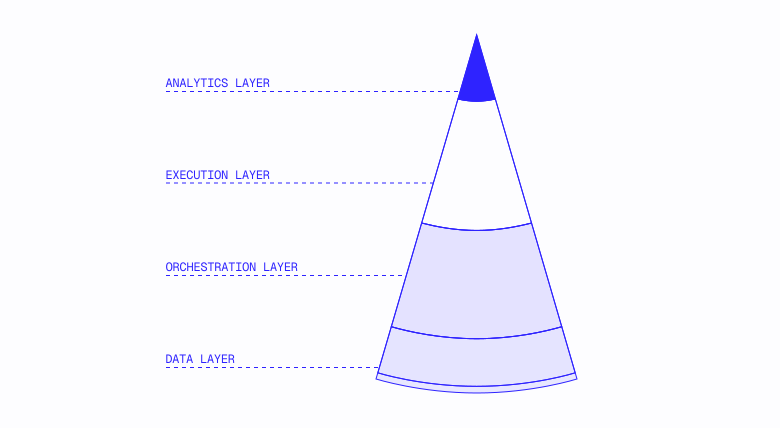
Your CRM (Salesforce, HubSpot) sits across all of these as the system of record. Not a layer itself, it's where the layers connect.
The data layer is foundational. It answers two questions everything else depends on:
1. What accounts should we work?: Which businesses exist, which fit your ICP, and which are worth pursuing right now
2. How do we reach them?: Who makes decisions, and how do you actually get them on the phone
Without a functioning data layer, the other layers have nothing to work with: orchestration can't assignф accounts you haven't identified, execution can't reach decision makers you lack contact info for, and analytics can't optimize a motion built on gaps.
The structured vs. unstructured problem
For companies that sell to tech buyers, the data layer already exists and is structured, accessible, and commoditized. LinkedIn profiles follow predictable patterns. Corporate emails are [email protected]. Tools like ZoomInfo and Apollo plug directly into your CRM. The data layer is solved; you're simply choosing between vendors.
The data layer doesn’t exist, on the other hand, for companies that sell to local businesses. The sources that do exist each fail in specific ways:
You're not choosing between vendors; you're trying to assemble infrastructure from fragments never designed to work together in the first place.
The cost of missing a data layer
When you lack foundational data infrastructure, you don't just have "bad data" but in fact build your entire organization around the absence of that infrastructure.
You can't reach your full TAM
When only 15–20% of accounts have usable contact data, teams default to working only these with the other 80% sitting in the CRM—not because they're bad accounts but because nobody can reach them.
Over time, reps burn through the "good data" accounts. Then what? The addressable market is artificially constrained because you lack the infrastructure to reach it.
You hire for workarounds, not leverage
At one major POS company, the BDR team wasn't really selling. Instead they were just calling restaurants to find contact info to power field sales. They essentially hired an entire headcount tier to manually assemble the data layer that should have existed as infrastructure to start.
At a restaurant SaaS company, meanwhile, reps spent half of every Friday preparing for the following week: not strategizing but hunting for owner contact information.
A similar thing was happening at a major payments company—having built an internal deduplication pipeline since no vendor could accurately match restaurant accounts to existing CRM records—and a food-delivery platform, staffing up a manual validation process after discovering their TAM numbers were wildly inflated.
The underlying pattern? In these examples, RevOps focused on data stitching, BDR teams tasked with research instead of selling, and engineering resourced to build data workarounds instead of product features. In doing so, each hire solved an immediate problem while cementing the absence of infrastructure as permanent.
You stitch together insufficient tools
One GTM leader described her company's data journey:
“They were trying to use Seamless for a while. That wasn't working. They got access to Clay and I can't get a Clay table to work to pull any of the data I need.”
A payments company going into their budget year described their setup: three separate data vendors for restaurant accounts—qualification data from one, activity reports from another, contact data from a third. None sufficient alone. Still requiring manual stitching to create a usable view.
The pattern is everywhere: companies download "random lists from a bunch of third-party sources," dump them into the CRM, and then discover they don't actually know which accounts are addressable. RevOps teams spend their time juggling CSVs rather than enabling sales.
You can't scale efficiently
Your outbound capacity has a ceiling in the absence of a data layer; if every account requires 15 minutes of research before a single dial, you can't scale the motion without scaling the research labor proportionally.
Adding reps doesn't linearly increase output when each rep needs to manually build his or her own data foundation. Companies without a data layer see cost-per-rep increase (not decrease) as they grow, the opposite of how infrastructure should work.
Companies accept lower dial volumes, slower ramp times, and constant firefighting because they've concluded that's simply how selling to local businesses works.
You can't move on opportunities
When a new franchise announces expansion, a competitor stumbles, or a vertical suddenly becomes hot, you lack the means to quickly capitalize: every new initiative requiring rebuilding the data foundation from scratch.
Strategy without infrastructure is just a plan you can't execute. The companies that win market moments have both, the infrastructure letting them move while competitors are still assembling data.
You erode rep trust
A rep calls a number from the CRM and reaches the wrong person. A disconnection follows for another account. A third attempt reaches the restaurant's main line, and the hostess has no idea who owns the place. After enough of these experiences, the rep stops trusting the data entirely. As shared by one healthcare SaaS GTM leader:
"We felt like the mobile numbers were unreliable and just stopped using enrichment credits on them."
GTM leader at a healthcare SaaS company
Once trust erodes, reps revert to manual research or their own methods such as building personal spreadsheets. Your mid-market AE is spending entire afternoons fiddling with Clay tables instead of selling.
The damage spreads: reps talk to each other, and one bad experience becomes team folklore. New hires inherit the skepticism, trained by reps who've been burned so in turn never trust the system themselves. Even if you bring in better data later, you're fighting the cultural memory of past failures.
The math: What missing infrastructure actually costs
Tactical costs are quantifiable. Here's how to calculate them for your team:
The research tax
Based on $50/hour fully loaded BDR cost. At one company selling to dental clinics scaling outbound, SDRs reported spending "5 to 10 minutes on manual research per lead”.
One SDR at a workforce management company put it directly:
"I spend up to half my day on finding accounts and contacts."
That's not just a productivity problem; it's a cost problem. A fully loaded SDR costing $100–120k/year (salary, benefits, tools, management overhead) and spending half his/her time on research instead of selling = $50–60k per rep, per year in misallocated labor.
The bad data tax
Real example: A dental company discovered its CRM contained 300,000 accounts, double its actual TAM of 150,000 practices. Half of these "accounts" were duplicates or misclassified records. While the inbound team triaged over 15,000 leads in a year, only half were "verifiable" or "useful."
An FTE dedicated solely to lead triage isn’t a process but a tax on missing data infrastructure.
The coverage ceiling
Coverage is the percentage of your TAM giving you usable decision-maker contact data, a mobile number for someone who can say "Yes." At 50% coverage, half your accounts are callable. At 15% coverage (typical for teams using LinkedIn-based tools), 85% of your market is effectively dark.
The coverage ceiling is the hard limit on your outbound capacity imposed by this gap. You can't sell to accounts you can't reach, after all, no matter how many reps you hire or how good your dialer is.
When only 15–20% of accounts have usable contact data…
TAM: 10,000 restaurants
Accounts with DM mobile: 1,500 (15%)
Accounts workable without research: 1,500
Accounts requiring manual research: 8,500
At 15 min research per account:
→ 2,125 hours to make remaining TAM callable
→ 53 weeks of full-time research labor
→ Or: you just don't work 85% of your market
Most teams choose option B, working the 15% and leaving 85% on the table not because those accounts are bad but because the infrastructure to reach them doesn't exist.
The compound effect
These costs multiply:
At 10 reps, you're effectively paying for 13 but only getting output from 10—and only reaching 15% of your market.
Measuring the gap
Most companies don't realize their data layer has holes until they measure. Section 1.11: The One-Page Diagnostic provides a test to quantify coverage, connect rates, and the hidden cost of workarounds. Run it before deciding whether infrastructure investment makes sense for you.
When infrastructure investment makes sense
Not every company needs to solve this immediately. A sub-optimal data layer is acceptable when:
Your volume is low enough to absorb the friction
- Working 20 accounts per month? Manual research is annoying, not business-critical.
You're still finding product-market fit
- If your ICP is still evolving, optimizing infrastructure is premature (manual research also teaches you things systems won't).
Your ACV justifies the investment per account
- At $50k ACV, 30 minutes spent researching a qualified account is fine. The math breaks, though, at $3k ACV.
Your field reps have established territory relationships
- Veteran reps who've spent years in their territory are the data layer, until they leave or you try to expand or hire someone new.
The pain becomes acute when you try to scale: more reps, more accounts, more velocity. That's when the missing data layer becomes the constraint.
Quick reference
Signs your data layer has holes
What a data layer changes (and what it doesn't)
What changes:
- Your bottleneck shifts from "Can we reach anyone?" to "Do we have the right scripts for the owners we’re reaching?"
- New campaigns become execution questions, not data-assembly projects.
- You can measure and optimize what wasn't visible before (coverage, connect rates, contact accuracy).
What doesn't change:
- You still need reps who can sell; data doesn't fix bad discovery or weak pitches.
- You still need to create a theory around your ICP identity and why you win; reaching more wrong-fit accounts faster just accelerates waste.
- You still need good messaging; a mobile number doesn't matter if the opener doesn't land.
The key question
The question isn't whether you have data gaps. You do. The question is whether you can size them, cost them, and show the plan to close them.
1.8 How Restaurant Data Decay Breaks Your GTM Data
"One of our top reps sells a ton of accounts, and he’s great at closing. But a quarter of his accounts churn within a 100 day period"
That's a RevOps leader describing his/her best performer—not a struggling rep, the absolute best. The problem isn't effort or skill; it’s that restaurant churn is structural, and most GTM motions aren't built to account for it. Incentivizing the wrong behavior and selecting the wrong accounts can amplify this.
We power go-to-market for DoorDash and dozens of other teams that sell to restaurants at scale. The patterns here come from watching what happens when high-churn economics meet stagnant data layers.
The math behind the problem
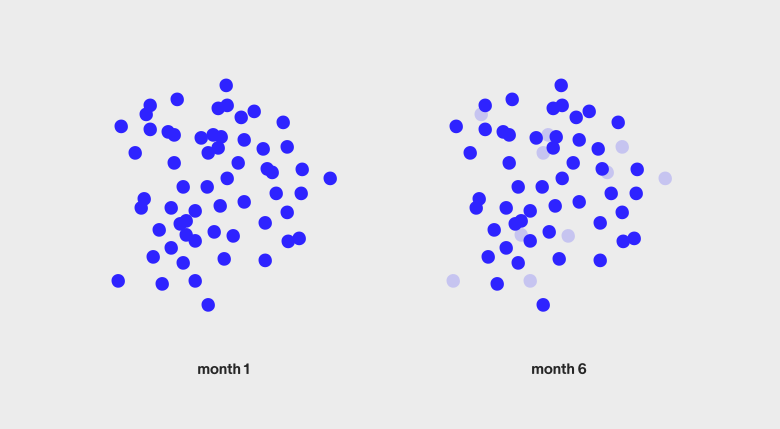
Seventeen percent (17%) of restaurants fail within their first year. Over five years, nearly half of your TAM will have closed. Bureau of Labor Statistics data speaks to this:
That 17% annual closure rate isn't a data-quality problem; it's a structural feature of the industry. Combined with the 3–5% net margins we covered in 1.1, this creates GTM dynamics that don't exist in other verticals.
What this means for your data layer
Seventeen percent (17%) of your CRM goes stale every year. Not because your data vendor failed but because the businesses themselves closed. Annual cleaning is the bare minimum. Monthly or quarterly refreshes are what keep the machine running.
Stagnant source data doubles your cost per record. If your provider pulls from stagnant 5-year-old sources, roughly half those records are dead on arrival; you're paying for contacts at businesses that no longer exist. Fresh data at a premium beats cheap data that's half worthless.
Closed restaurants get replaced. When commercial real estate optimized for restaurants becomes available, another restaurant typically moves into the same location. Your TAM isn't shrinking; it's churning. You need to constantly replenish with new openings.
Speed to new accounts matters. In a market where everyone's TAM churns, getting to new restaurants first is a real advantage. Selling to someone without a solution beats trying to rip and replace a competitor who installed last month, this narrow opportunity window shrinking as more orgs begin tracking these signals.
Some accounts can't be served at all. Beyond closures and bad data, your TAM includes accounts that are open, accurate, and fundamentally unserviceable but just can't work with your product.
One platform, for example, discovered that 13% of restaurant accounts in its CRM couldn't actually support delivery as either mall food court locations lacking driver-accessible entrances, restaurants outside the serviceable radius, and/or setups incompatible with pickup flow. These weren't bad records but instead real restaurants that would never convert.
What makes an account "unserviceable" varies by business model. Most teams never run this filter, which means reps burn time on accounts that were never going to close in the first place.
What this means for your model
Selection becomes critical to improve LTV and lower churn
You want to avoid the 17% of restaurants that close in Year 1 at all costs.
If you're deficient at selecting accounts and let your reps sell to everyone, your natural churn rate will be 17% of your customer base—exactly what we saw with the top rep in the opening example. This isn't a rep problem; it's a selection problem.
The goal is to beat the baseline, achieving churn below 17% in a given year.
You want to find the 35% of forever restaurants that are still operating and expanding in 10 years. A stagnant data layer can't tell you which accounts are worth pursuing; you need signals such as review velocity, location expansion activity, and operational health to identify and sell to these winners.
Infrequent data refresh guarantees rep inefficiency
When data isn't refreshed, three things happen
Territories look bigger than they are. A list of 100 restaurants might only have 60 callable accounts. Reps—measured against inflated numbers they can't actually work—begin asking for more accounts and complaining about the data.
Trust erodes. Reps stop working the territory with full effort having been burned too many times. They complain about the data instead of making calls, with maybe 30/100 really good accounts in your account lists that never worked because reps now default to distrusting data.
Verification eats selling time. Low certainty means reps need to check whether businesses are still open before dialing, this non-selling work consuming 30–50% of their day.
When this matters less
Not every team needs monthly refresh:
- Low volume: If you're working 50 accounts, annual cleanup is annoying but survivable.
- High ACV: At $25k+ deals, you can afford to manually verify before each outreach.
- Established territories: Veteran reps who know their market can personally catch closures through their network.
The pain scales with volume. At 500+ accounts per rep with $3k ACV, a churn-blind data layer becomes a serious drag. This is exactly the game many vertical restaurant SaaS players are playing, making data layer refresh a core execution priority.
Measuring the churn tax
You don't need to know your "real TAM" to measure the impact of stale data. The 50-dial test in Section 1.11 will show you exactly how much of your dial time is wasted on dead data, disconnected numbers, closed businesses, and wrong contacts.
Add up disconnected + closed + wrong numbers from your test results to get your churn tax rate:
- <10% = Your data is fresh
- 10-20% = Normal decay, quarterly refresh would help
- 20-30% = Significant drag, 1 in 4 dials wasted
- 30% = Critical, your list is more dead than alive
The new opening check: Ask your reps: "In the last month, did you discover any restaurants that weren't in your CRM?" If the answer is "Yes, several," you're missing new openings. Every restaurant they stumble across is a restaurant a competitor with a stronger data layer may have reached first.
The implication
High churn isn't a bug in restaurant GTM; it's the defining characteristic. Your data layer either accounts for it, or your reps pay the tax every day.
Stagnant lists decay. Annual refresh is too slow. The companies that win at restaurant GTM treat their data layer as an operational priority, not an occasional cleanup project.
1.9 The GTM Stack for selling to restaurants
Owner.com went from a 3% call-to-connect rate to 14-16%. They didn't change dialers. They didn't hire better reps. They changed the architecture underneath.
Kyle Norton, their CRO, describes what they built: a data warehouse holding every restaurant in their TAM, enrichment pipelines filling gaps, confidence scores flagging bad data, all before accounts ever hit the CRM. Reps stopped researching and started selling.
The architecture framework in this section builds on Kyle's model, one of the best-documented examples of restaurant GTM at scale.
Most restaurant GTM teams are running the opposite architecture: everything in the CRM, half of it wrong, and reps spending Friday afternoons trying to figure out who to call Monday.
We power go-to-market for DoorDash, Olo, Restaurant365, and dozens of other teams selling to restaurants. The patterns here come from hundreds of implementation conversations about what's actually working, and what isn't.
The standard GTM stack doesn't workfor restaurants
Every modern GTM stack is built on the same assumption: your buyers are on LinkedIn, respond to email, and work at companies with websites that ZoomInfo can crawl. For enterprise SaaS, this assumption holds. For restaurants, it fails at every layer.
The two-part GTM Framework for selling to local
Restaurant GTM breaks into two distinct problems, and your stack needs to solve both:
1. What accounts to work: Where does your TAM live? How do you identify and prioritize accounts? Where do you get decision-maker contact data?
2. How to work them: Once you have accounts and contacts, how do reps actually engage? What channels, tools, and workflows drive conversations and deals?
Most restaurant tech companies have reasonable answers for #2. Almost everyone struggles with #1. Let's look at each.
Part 1: What accounts to work
This is where traditional tools fail completely and where every restaurant tech company has built-in workarounds.
Where TAM lives: CRM vs. Data Warehouse

Your CRM is the system of record for working accounts, pipeline, activities, customer relationships, and everything else reps touch daily. That's precisely what it's built for, and it does it well.
The question is: Should your CRM also hold your full TAM, every addressable restaurant, worked or not? We believe the answer is “no” for most restaurant tech companies, the scale creating problems that compound over time.
Two systems, complementary roles:
Why this separation matters:
1. CRMs aren't built for TAM-scale data. Salesforce and HubSpot slow down with hundreds of thousands of records. Queries take longer, reports time out, and the UI becomes painful. You're paying per seat for a tool optimized for workflow, not for storing half a million restaurants you're not actively calling.
2. Enrichment happens in stages, not all at once. Account-level data (location count, cuisine, signals) lives in the warehouse; you need this to prioritize. Contact-level data (owner mobile, email) is only added when accounts move to CRM, which is where expensive per-unit costs apply and you'd waste money enriching 400,000 accounts when you'll only call 10,000 in the same year.
3. Data decay is easier to manage in a warehouse. Restaurant data decays at 17% annually, but keeping 500,000 accounts "fresh" in your CRM is impossible—requiring a full-time team just to manage data hygiene. It’s easier to keep them fresh in a warehouse with batch-refresh processes (with the product purpose built for high- volume data refresh).
4. Prioritization requires data that CRMs may struggle to hold. Sophisticated prioritization uses signals not in alignment with CRM data models: review velocity over time, menu changes, hiring patterns, competitor mentions, etc. Beyond third-party signal storage, first-party data must consistently accompany this. Warehouses handle this complexity; CRMs don't.
The data science parallel:
This pattern is familiar to those with data engineers on staff, mapping directly to established data-architecture principles:
The principle is simple: don't ask reps to work from a massive, half-enriched database. Give them a curated set of high-priority accounts with complete data, keeping the full TAM upstream so you can re-score, reprioritize, and pull fresh accounts next quarter.
The architecture that scales:
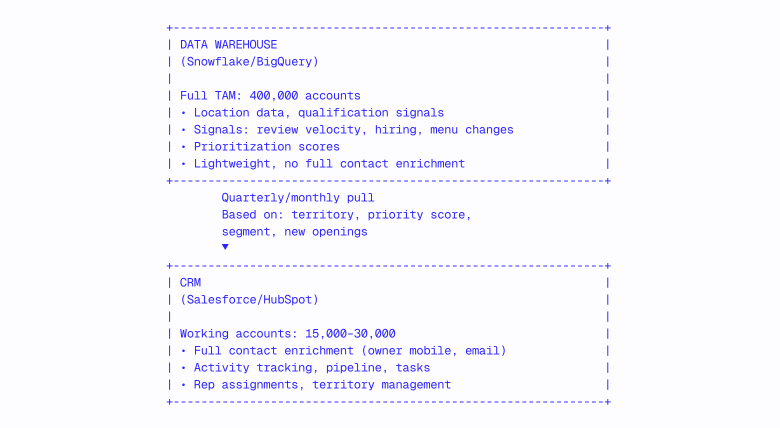
How accounts flow:
1. Warehouse holds everything. All 400,000+ restaurants in your addressable market, with basic data and prioritization signals.
2. Entity resolution on the CRM. CRM is ETL'd into the data warehouse, with first-party and third-party data tables possessing IDs allowing for scoring and processing.
3. Scoring happens in the warehouse. Combine signals (new openings, review velocity, location count, cuisine complexity) into priority tiers.
4. High-priority accounts get pulled into CRM. This occurs quarterly or monthly based on territory assignments and priority scores, typically including 15,000–30,000 accounts for a growth-stage team.
5. Full enrichment happens at CRM load. Only enrich contacts for accounts reps will actually call, paying for owners’ mobile numbers, first names, and emails.
6. Rep activity stays in CRM. This includes calls, emails, meetings, pipeline, and all the workflow data that makes selling possible.
7. Closed/churned accounts flow back. Outcomes inform the warehouse to improve future prioritization.
What most teams get wrong:
- Stuffing TAM into CRM: 400,000 records in CRM means spotty data, no prioritization, and reps who don't trust the system.
- Enriching everything upfront: When you pay for contact data on accounts that won't be worked for years (if ever), data decays, and teams end up accepting low-quality data as the only option.
- No feedback loop: CRM outcomes don't inform warehouse prioritization, so the same bad accounts keep getting loaded.
- Manual territory carves: Ops manually creates lists in spreadsheets instead of performing systematic pulls based on scoring.
Data/Enrichment: Where everything breaks
This is where traditional tools fail completely:
What teams try first:
- ZoomInfo/Apollo: Built for LinkedIn-based contact enrichment, with coverage for restaurant owners typically under 10%; works for large chain corporate HQ but fails for independents and franchisees.
- Clearbit: Company enrichment only; no contact data for local businesses.
- Clay: Powerful workflow automation, but only as good as its underlying data sources (unable to enrich if ZoomInfo and Apollo lack contacts); great for orchestration but not a coverage solution.
- People Data Labs: API-based enrichment; can supplement mobile numbers, but still limited for restaurant owners.
We typically see prospects using this tech stack with around 20% bad data, while missing an additional 20–30% net new accounts in their system, meaning a typical restaurant tech company's CRM is ~40–50% incorrect prior to calls even being made.
LinkedIn Sales Navigator: Cancel it
Sales Navigator is a default purchase for enterprise B2B sales teams. For restaurant GTM, it's often a low-ROI line item that persists because "that's what sales teams buy."
The math doesn't work:
Sales Navigator costs $100–180/user/month ($1,200–2,160/rep/year). For a 30-rep team, that's $36,000–65,000/year on a tool built for a buyer persona that doesn't exist in your market.
Why it persists:
- Sales leaders come from enterprise B2B, where Sales Navigator was essential.
- "Everyone has Sales Navigator" feels like table stakes.
- Occasional wins on enterprise chain HQ contacts justify renewal.
- No one runs the coverage analysis to see actual usage.
When Sales Navigator makes sense for restaurant GTM:
- Enterprise chain corporate contacts: The VP of operations at a 200-location chain probably has a LinkedIn profile.
The reallocation: hat $36–65k/year often delivers more value invested in mobile number enrichment, where the delta between having and not having the owner's cell is the difference between 3% and 16% connect rates.
Clay: The workaround
Clay deserves a special mention because it's increasingly common—and commonly misunderstood for restaurant GTM.
Why it doesn't solve the restaurant problem:
- Underlying enrichment sources (Clearbit, Apollo, etc.) still fail for local businesses
- Horizontal flexibility but no vertical-specific data
- Great for tech buyers, still LinkedIn-dependent at its core
"Clay works really well for signals... What doesn't work well is getting owner contact information. We did a larger scale test with them and found that over 50% of the contacts that we got into our system from Clay for owners or GMs, key people we want to be talking to were incorrect."
Head of Sales,
beverage technology company
The key distinction: Clay is a workflow tool, not a data source. If your underlying sources don't have restaurant owner mobile numbers, Clay can't magically create them.
The economics trap: Clay's credit-based pricing works well when the first provider in a waterfall returns data (2 credits). For restaurant owners without LinkedIn profiles, the waterfall cycles through multiple providers, each consuming credits, before finding data or returning nothing. What costs $32/1,000 records for enterprise prospects can cost $128+/1,000 for restaurant owners, with lower coverage.
The coverage mirage: "mobile numbers" vs. decision-maker mobiles
This is one of the most common traps in vendor evaluation. A provider reports 70% mobile number coverage, looks great on paper. But when you dig in, those "mobile numbers" are often:
- Underlying enrichment sources (Clearbit, Apollo, etc.) still fail for local businesses
- Horizontal flexibility, but no vertical-specific data
- Great for tech buyers, still LinkedIn-dependent at its core
The metric that matters isn't "mobile number coverage." It's decision-maker mobile coverage: the owner's personal cell, or the GM who can actually say yes.
How to pressure-test coverage claims:
1. Ask for the breakdown: What percentage are verified owner/DM mobiles vs. general business numbers?
2. Run a dial test: Take 100 "mobile numbers" from the provider and actually call them. How many reach the decision-maker vs. a hostess or voicemail for the restaurant?
3. Confirm duplicates: If you see a high % of duplicate mobile numbers, there's no way these are unique DM mobile numbers and are more likely to be the business general phone number that converts at lower rates
4. Compare connect rates: If your "mobile" connect rate is under 8%, you probably have business lines, not mobiles.
A provider with 40% coverage on actual owner mobiles will outperform one with 80% coverage on general business numbers but 10% coverage on owner mobile numbers with meetings booked.
Part 2: How to work them
Once you've solved (or worked around) the "what accounts" problem, how do reps actually engage?
Engagement: Phone-first, by necessity
"99% of our customers, when we ask them how their reps book meetings, it's on the phone."
David Patterson-Cole,
Founder, DataLane
This is structural, not preferential. Mobile numbers are dramatically more effective than email for reaching restaurant owners. The difference isn't incremental; it's a step-function difference.
Restaurant owners:
- Don't check LinkedIn messages
- Have email inboxes full of spam from food vendors, suppliers, and every SaaS company under the sun with a "restaurant" keyword
- Are unreachable via email during service hours (i.e., most of the day)
- Will pick up their personal cell upon seeing a local number
Email has its place, but that place is follow-up, not first contact. A well-timed email after a phone conversation can reinforce next steps. A cold email to a restaurant owner, on the other hand, competes with hundreds of other messages and lands in an inbox checked once a day (if that). The math doesn't work.
Dialer patterns we see:
- Single-line dialers (Orum, PhoneBurner, etc.)
- Parallel dialers (Nooks, Orum multi-line, Koncert)
- Personal cell phones ("reps using their own phones")
- Shared dialer pools within teams
The parallel dialer trap: Counterintuitively, parallel dialers can decrease rep productivity for restaurant outreach. Here's why:
Parallel dialers connect reps to live answers faster than other methods, but restaurant conversations require preparation. When a rep doesn't know which restaurant just picked up, who the owner is, or what his/her situation looks like, the call starts cold and on the wrong foot.
The mobile number unlock: The single biggest predictor of restaurant outreach success is possession of the owner's personal mobile number vs. the restaurant's main line, with connect rates of 12–18% vs. 3–10%, respectively.
Call Intelligence: The layer on top of dialers
Once calls happen, a new category of tools captures and analyzes them:
Call recording and CRM automation:
- Momentum, Gong, Chorus: Record calls, transcribe conversations, and increasingly auto-populate CRM fields.
- The value proposition: Reps spend less time on admin work and more time selling.
- For restaurant GTM specifically, these tools can track which objections arise, which talk tracks work, and where reps are struggling.
What we're seeing work:
"We use Momentum, it fills Salesforce fields from call recordings. Reps don't touch CRM after calls."
Kyle Norton,
CRO at Owner.com
This matters more for restaurant sales than enterprise because:
- Higher call volumes mean more admin burden
- Shorter sales cycles mean less time for CRM updates between calls
- Rep turnover is higher, so institutional knowledge capture becomes critical
Key takeaways
1. Restaurant GTM is a two-part problem. "Which accounts to work" and "How to work them" call for different tools. Most teams have reasonable answers for the second part, but almost everyone struggles with the first.
2. Traditional B2B data tools fail for restaurants. ZoomInfo, Apollo, and Clearbit are built for LinkedIn-reachable buyers, but restaurant owners aren't there. Accepting 10% coverage isn't a data-quality issue; it's a strategic gap.
3. Separate TAM from CRM. Keep full TAM in a data warehouse, and pull working accounts into CRM quarterly. As the system of record for working accounts, your CRM isn’t designed to hold 500k restaurants you're not actively calling.
4. Phone beats email; mobile beats the main line. Cold email doesn't work for restaurant owners, who aren’t at desks checking their inbox. Owner mobile numbers are the unlock, with email pegged for post-contact follow up—not first touch.
5. Budget for refresh, not just acquisition. Restaurant data decays at 17% annually. Data investment isn't a one-time thing; it's operational infrastructure. If you're not budgeting for ongoing refresh, your coverage will degrade every quarter.
6. Measure both layers. "Which accounts" metrics: coverage, accuracy, freshness. "How to work them" metrics: connect rate, conversations per day, conversion. If you only measure the second, you'll optimize execution on bad data.
Is your stack working?
The stack categories above are the building blocks; whether they're working together or not is a totally different question.
To find out, spend two hours completing the One-Page Diagnostic in Section 1.11 to specifically learn:
- Which percentage of your TAM is actually workable
- How much dial time you're losing to bad data
- What you're paying reps to research instead of sell
If you find yourself unable to pull the basic metrics (mobile coverage, contact coverage, data freshness), that's the most important takeaway; you can't optimize what you can't measure.
